The full engine, in depth.
Every part of TLM Forge, explained in plain words, each with its own page: what it does, how to use it, and why it helps. You only ever type one command, /tlmforge:build, and TLM Forge runs the right steps for your task.
New here? The basics in one minute
TLM Forge is a plugin for Claude Code. You install it once, type /tlmforge:build, and describe what you want. Instead of writing code straight away, Claude follows a disciplined process: it checks it understood you, plans, writes tests first, and has separate AI reviewers check the work before it ships. How much of that process runs depends on the size of the task.
How much process does my task get?
| Size | What kind of change | Examples | What TLM Forge does |
|---|---|---|---|
| Light | No new logic. A change you can read in ten seconds. | Fixing a typo, renaming something, changing a config value | Claude makes the change directly, writing a test first, and shows you a quick diagram. No reviewer agents. |
| Medium | Fixes or improves something that already exists. | A bug fix, tidying up a module, adding missing tests | You approve a diagram first. Then a short written analysis of the fix, a plan that two reviewers check, tests first, and a final review by two reviewers (one more each if your change touches the UI). |
| Deep | Adds something new, or changes how your app makes a security decision. | A new feature, API endpoint, screen or integration, or a change to how login, passwords, permissions or session tokens work | The full process: diagram sign-off, a full risk audit, a reviewed plan that includes a security threat review, tests first, a final review by five reviewers (one more if your change touches the UI), and a check on a real running environment. |
TLM Forge picks the size for you and tells you in one sentence. Disagree? Just say “go deeper” or “go lighter”.
What happens, step by step
| Step | What happens, in plain words | Runs on |
|---|---|---|
| Size it up | Decides Light, Medium or Deep and tells you in one sentence. | Every task |
| Check understanding | Restates your request and asks about anything unclear. | Every task |
| Update the code map | Refreshes the architecture notes for the parts your change touches. | Medium, Deep |
| Show the design | Draws a diagram of the change. On Medium and Deep it waits for your OK, then you sign a short list of goals. | Every task |
| Audit the request | Deep: lists hidden assumptions, security risks and rollback risks before any code. Medium: a short written analysis of what broke and how to fix it. | Medium, Deep |
| Plan and review the plan | Writes a file-by-file plan; independent reviewers check it. | Medium, Deep |
| Build, tests first | Writes a failing test, then the code that makes it pass, one phase at a time. | Medium, Deep |
| Final review | Separate reviewers check the finished code; serious problems get fixed, test first. | Medium (2 reviewers, 3 with UI), Deep (5, or 6 with UI) |
| Check it for real | Proves the feature works on a real running environment. | Deep |
| Hand over proof | A page with the working result, before and after, and a status report. | Medium, Deep |
What the problem labels mean
| Label | What it means | What happens to it |
|---|---|---|
| CRITICAL | Serious enough to stop the work from shipping, for example a security hole. | Fixed before work ships, test first. If it cannot be fixed, it is brought to you. |
| HIGH | Must be fixed before launch. | Fixed before work ships, test first. |
| MEDIUM | Should be fixed, but does not stop the work. | Written down on a list of leftovers for you, instead of looping forever. |
| LOW | Nice to fix. | Written down on the same list. |
Every feature, with its own page
The pipeline
The steps TLM Forge runs for you, in order, after you type /tlmforge:build and describe your task. You never start them one by one: TLM Forge picks which ones your task needs based on how big and how risky it is.
Checks it understood you before writing anything
Before any code is written, TLM Forge repeats your request back in two or three sentences and lists anything it is unsure about. If a question could change the design, Claude asks you and waits. A misunderstanding costs you one reply instead of a wasted build.
Read the documentation![A "Team invites" feature request with the requirement "Invite links work for new users." highlighted, and a dotted line to a TLM Forge terminal at Stage 0.5 that restates the request, flags "[BLOCKING] Does a link expire?" and waits, with a card quoting the highlighted requirement and the footer "Nothing runs until you answer".](/images/features/F01_IntentCheck.webp)
Checks big and risky changes harder than small ones
Before any work starts, TLM Forge sorts your task into one of three levels: Light, Medium or Deep. Small, safe changes stay fast, while new features and anything that changes how your code makes a security decision get the full set of checks. You can move the level up or down with one phrase.
Read the documentation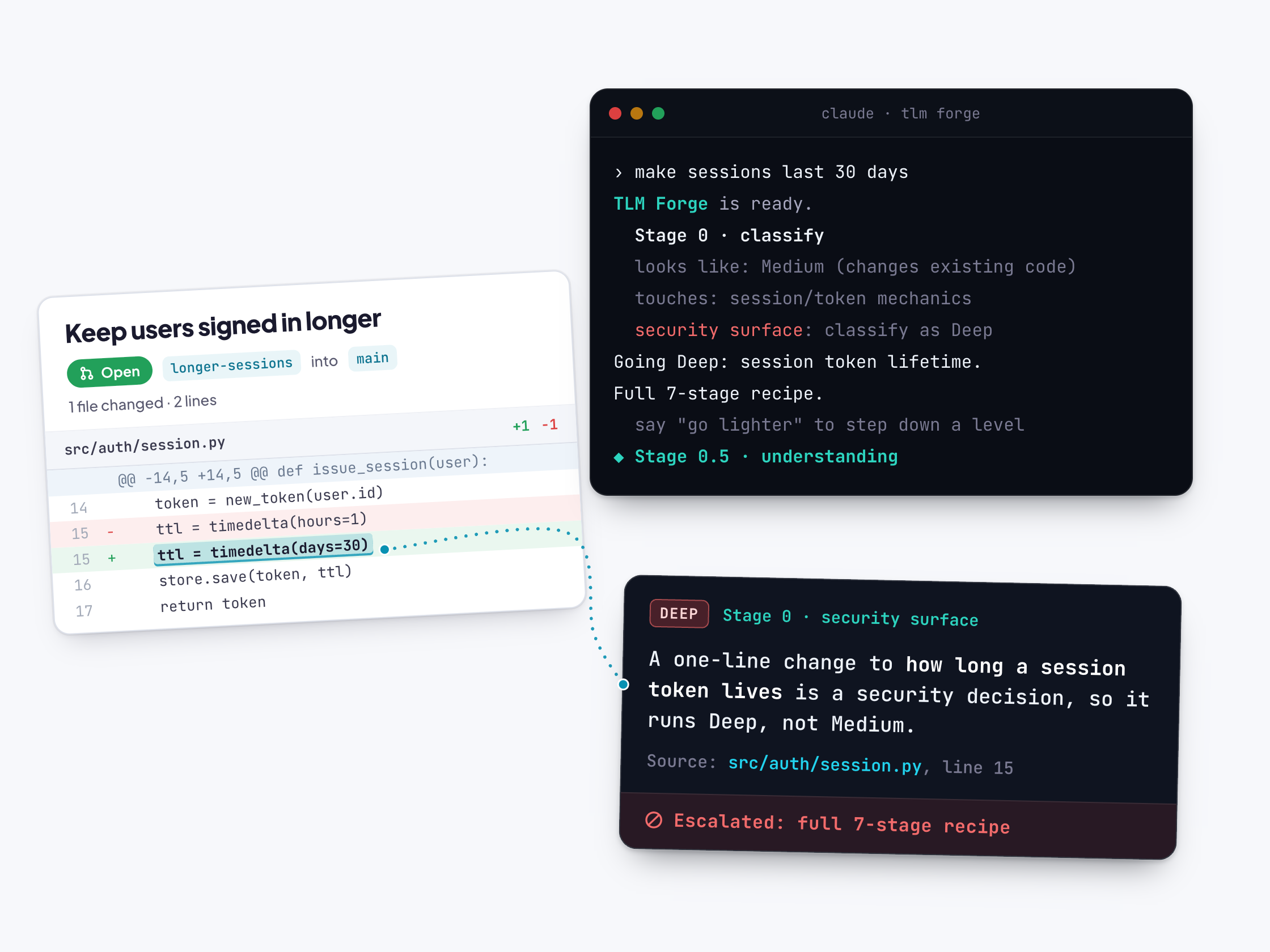
Keeps the map of your system up to date
TLM Forge keeps a written map of how your code fits together. Before planning a Medium or Deep change, it checks which parts of your code changed since the map was last updated and rewrites only those parts. Planning and reviews then start from an accurate picture.
Read the documentation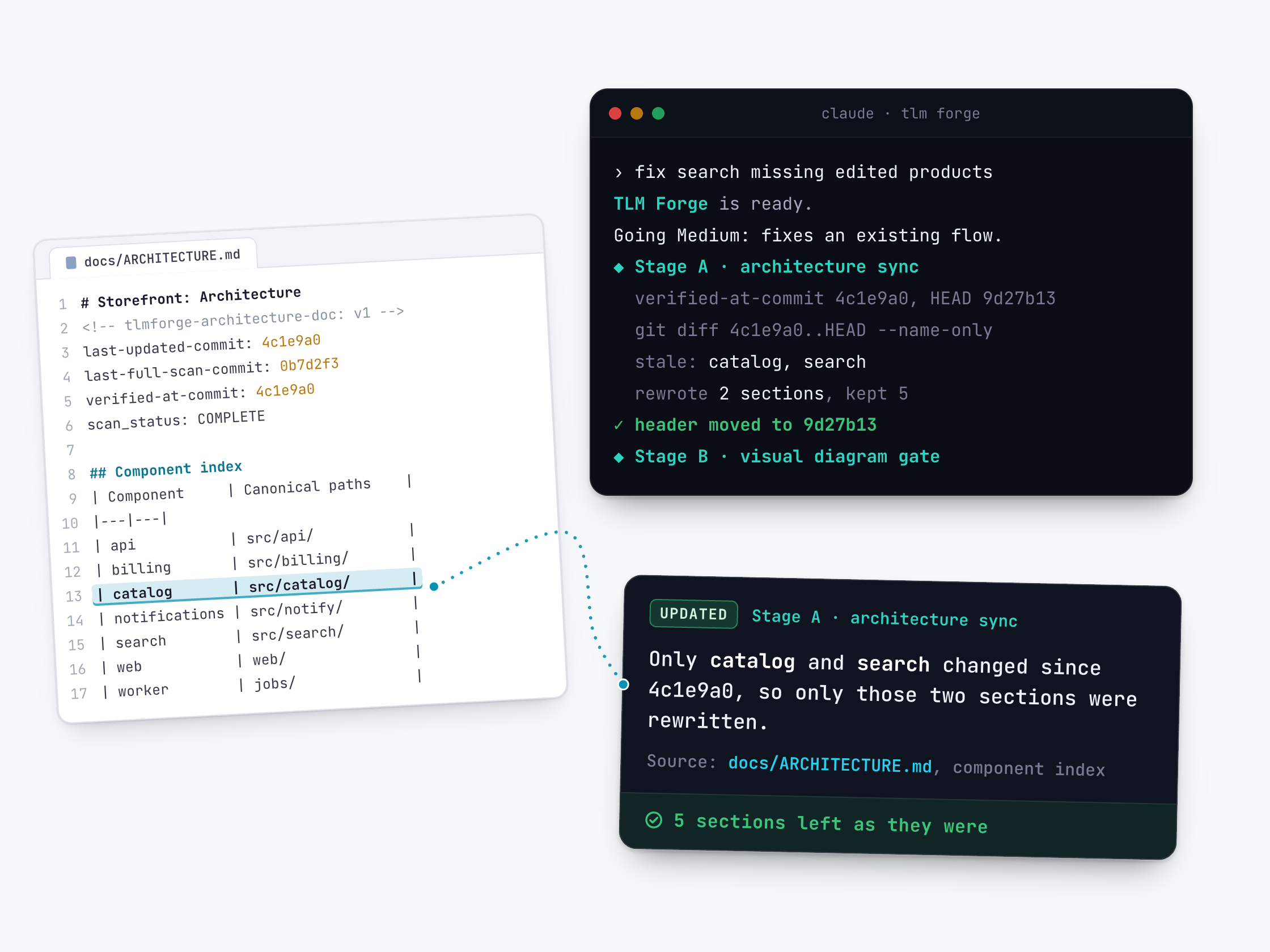
Shows you the design and waits for your OK
Before any code is written, TLM Forge draws two simple diagrams of how the change will work. On Medium and Deep work it waits for your reply, then asks you to sign a short written goal with a clear definition of done. On Pro, a check built into the plugin enforces the wait.
Read the documentationFinds the hidden risks in your request first
Before a plan is made, TLM Forge writes a risk check of your request: unstated assumptions, ways it could fail, costs and steps that cannot be undone. On Deep work, each risk is ranked and comes with a recommendation. Questions only you can answer pause the run until you reply.
Read the documentation![A feature request with "Retry the charge if a payment fails" highlighted, and a dotted line to a CRITICAL assumption from TLM Forge's Stage 1 spec audit: it doesn't say how many times or whether a customer can be charged twice, one of six findings surfaced before any code, raised as a [GATE-BLOCKING] question you answer before any code is written.](/images/features/R1_SpecAudit.webp)
A written plan, checked by fresh reviewers, before any code
Before Claude writes any code, TLM Forge has it write a step-by-step plan that names every file it will change and every test it will add. Then AI reviewers who did not write the plan check it for flaws, so a bad design is caught while it is still cheap to fix.
Read the documentation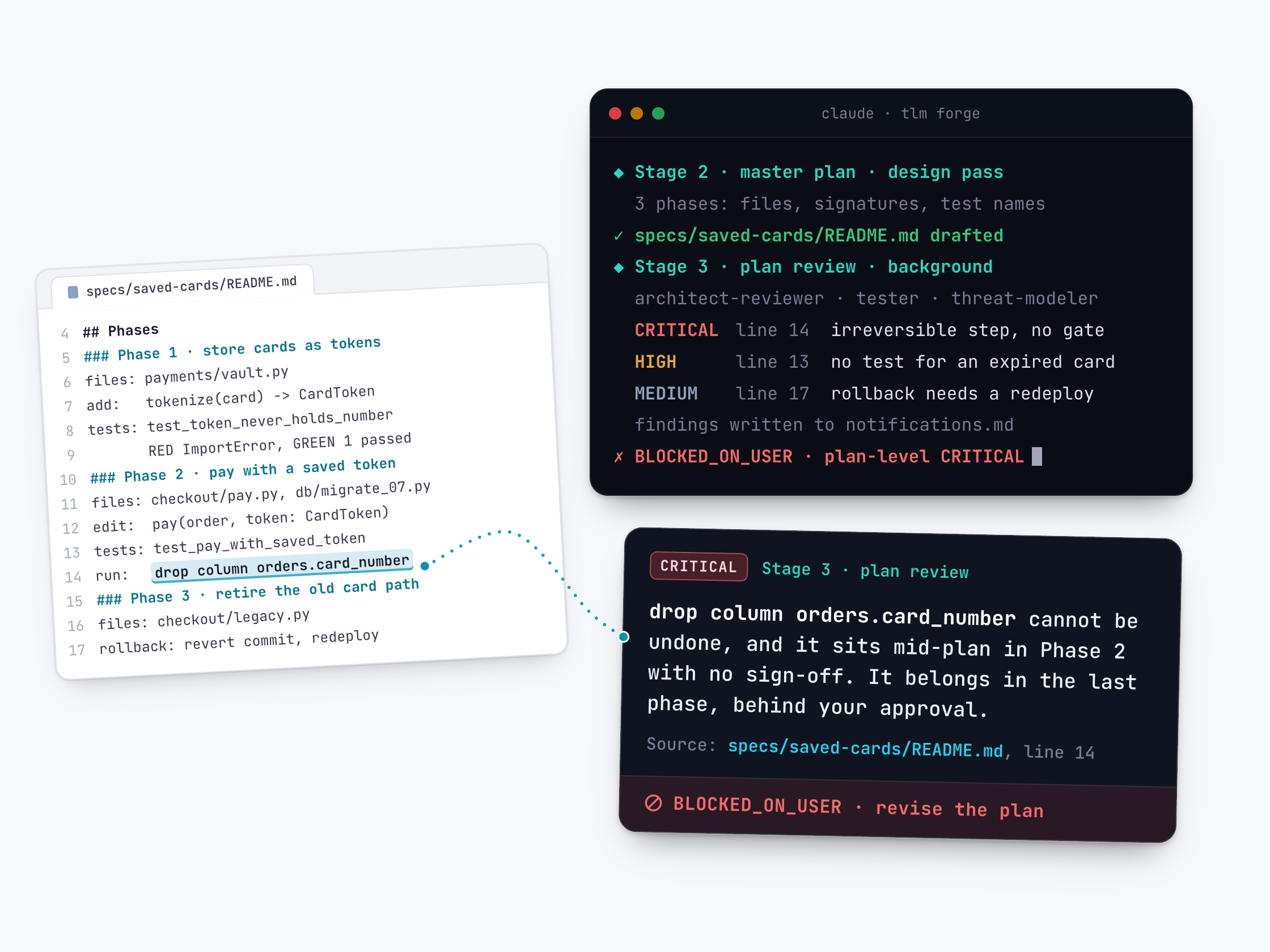
Tests first, one small phase at a time, with proof saved
TLM Forge builds your change in small, numbered phases. In each one, tests are written first and must fail, then the code makes them pass. What counts as passing is committed before the tests run, and the real results after. Your full existing test suite runs at the end.
Read the documentationSeveral reviewers check the finished change at once
When the build is done and all tests pass, several specialist AI reviewers read the whole change at the same time. Only serious problems (CRITICAL and HIGH) get fixed, tests first. Smaller ones go on a list for you. TLM Forge tells Claude not to commit or publish until every reviewer has reported.
Read the documentation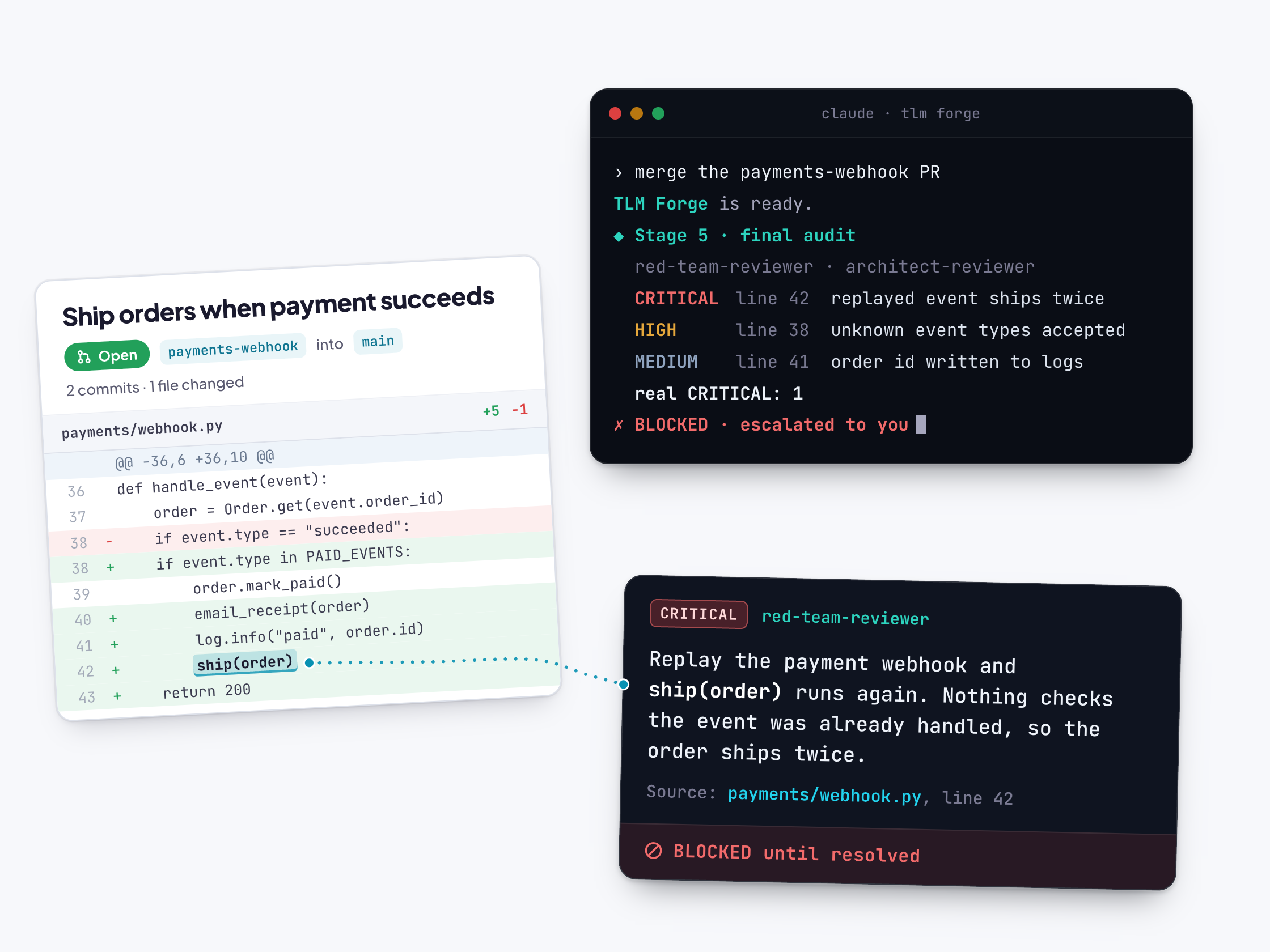
A reviewer that stays silent never counts as a pass
Every reviewer must fill in a standard results form, not just write prose. If a reviewer skips the form, or blocks the work without listing a single problem, TLM Forge counts that as a CRITICAL instead of a quiet pass. The decision comes from counting serious problems, not from the reviewer's tone.
Read the documentationCommits and pushes pause if code changes after review
When the final review finishes, TLM Forge records exactly which version of your code it checked. If code changes after that, a check built into the plugin stops Claude from committing, pushing or merging until the new code gets a short review. Notes and reports in the specs/ and docs/ folders still go through.
Read the documentation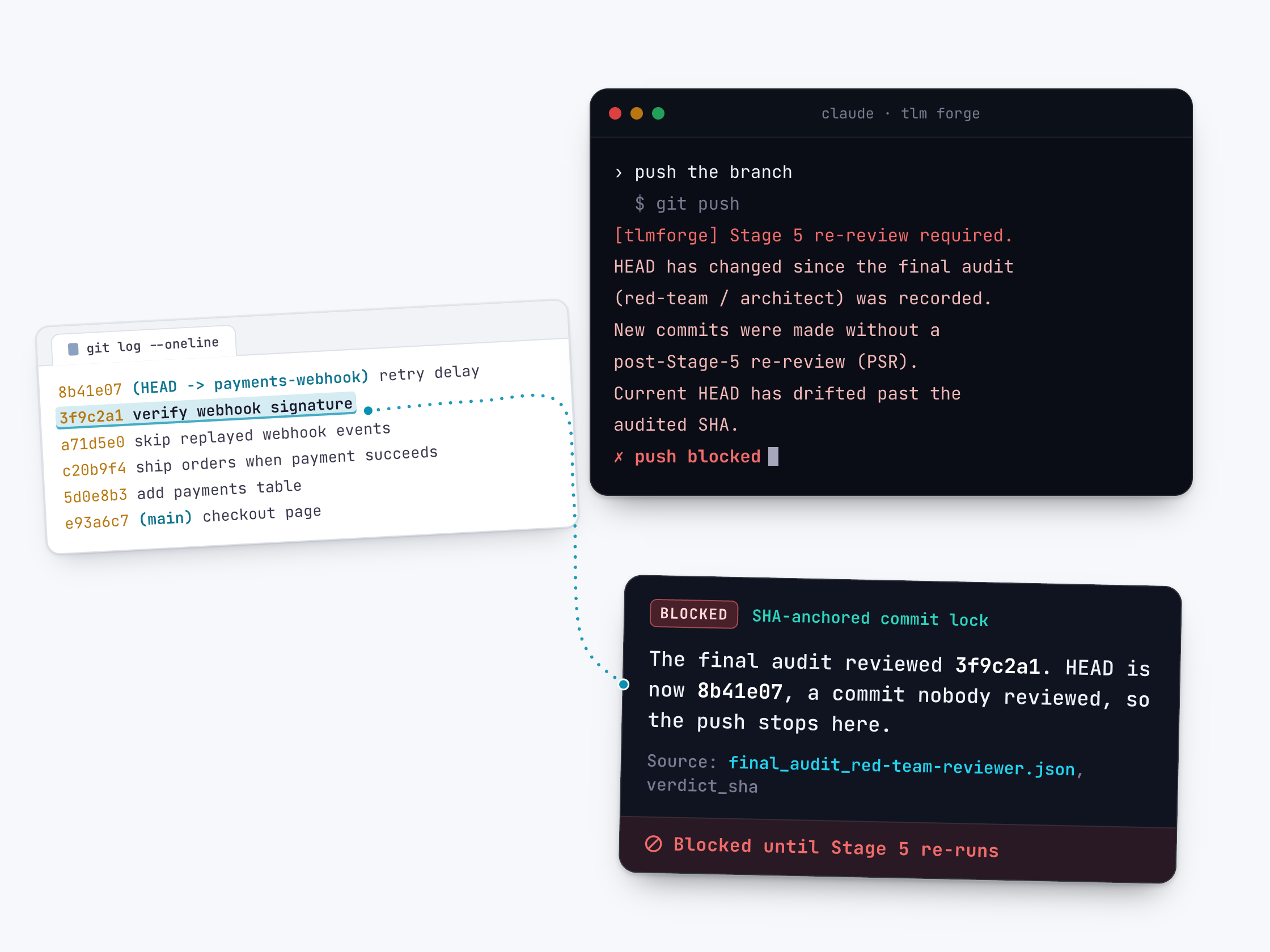
New features are tested on a real system, not fakes
On Deep work (new capabilities or security changes), Claude tests the change on a real deployed copy of your app instead of fakes, and saves the results with the commands to rerun them. If you ask, a separate checker that never saw the code tests each goal and reports what fails.
Read the documentation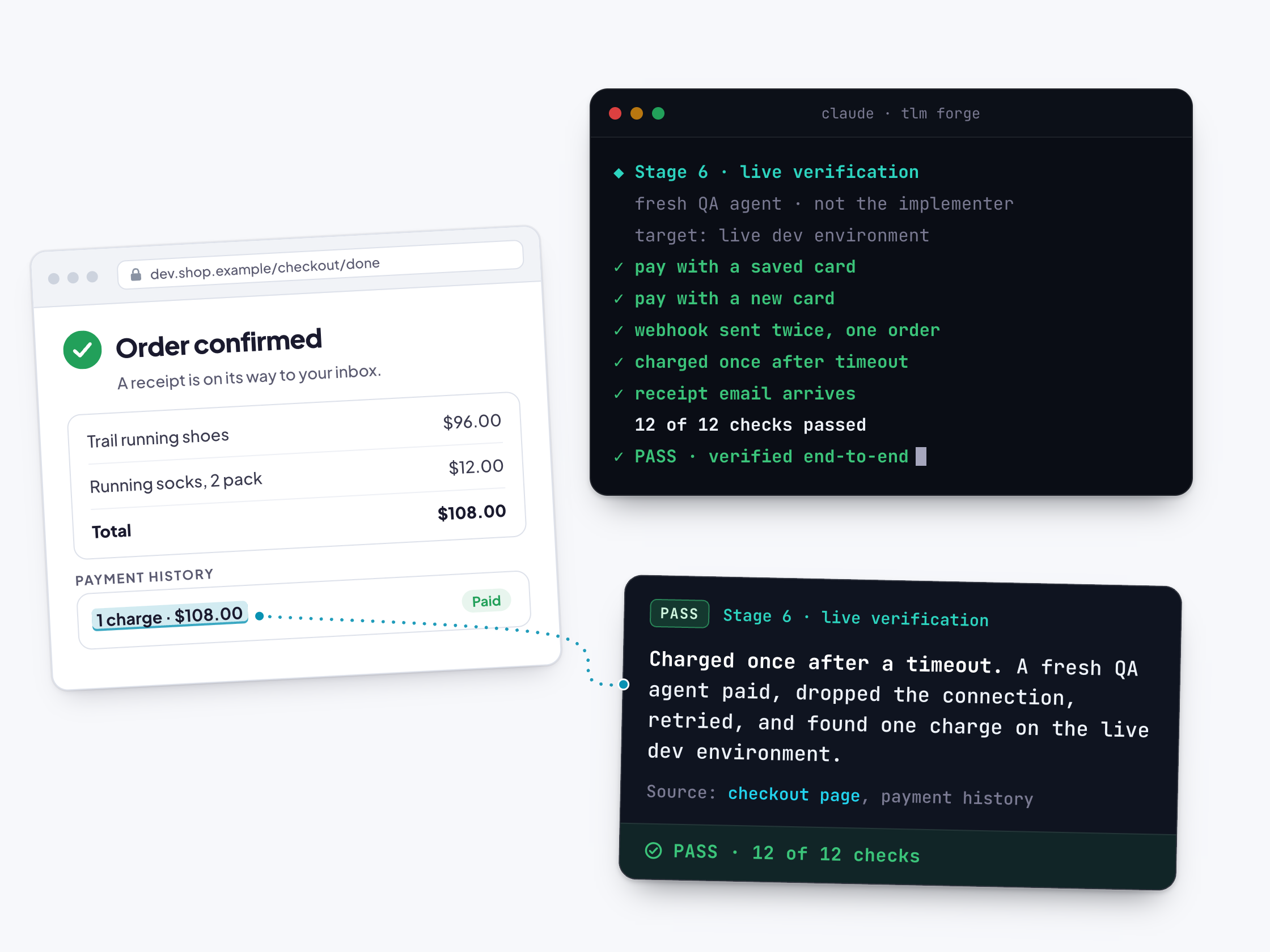
Every run ends with proof you can open and look at
At the end of a Medium or Deep run, TLM Forge gives you one page of proof: a version you can run, screenshots or real output, and before and after views wherever a before exists. Claude also writes a status report with the leftover issues and saves lessons for the next feature.
Read the documentation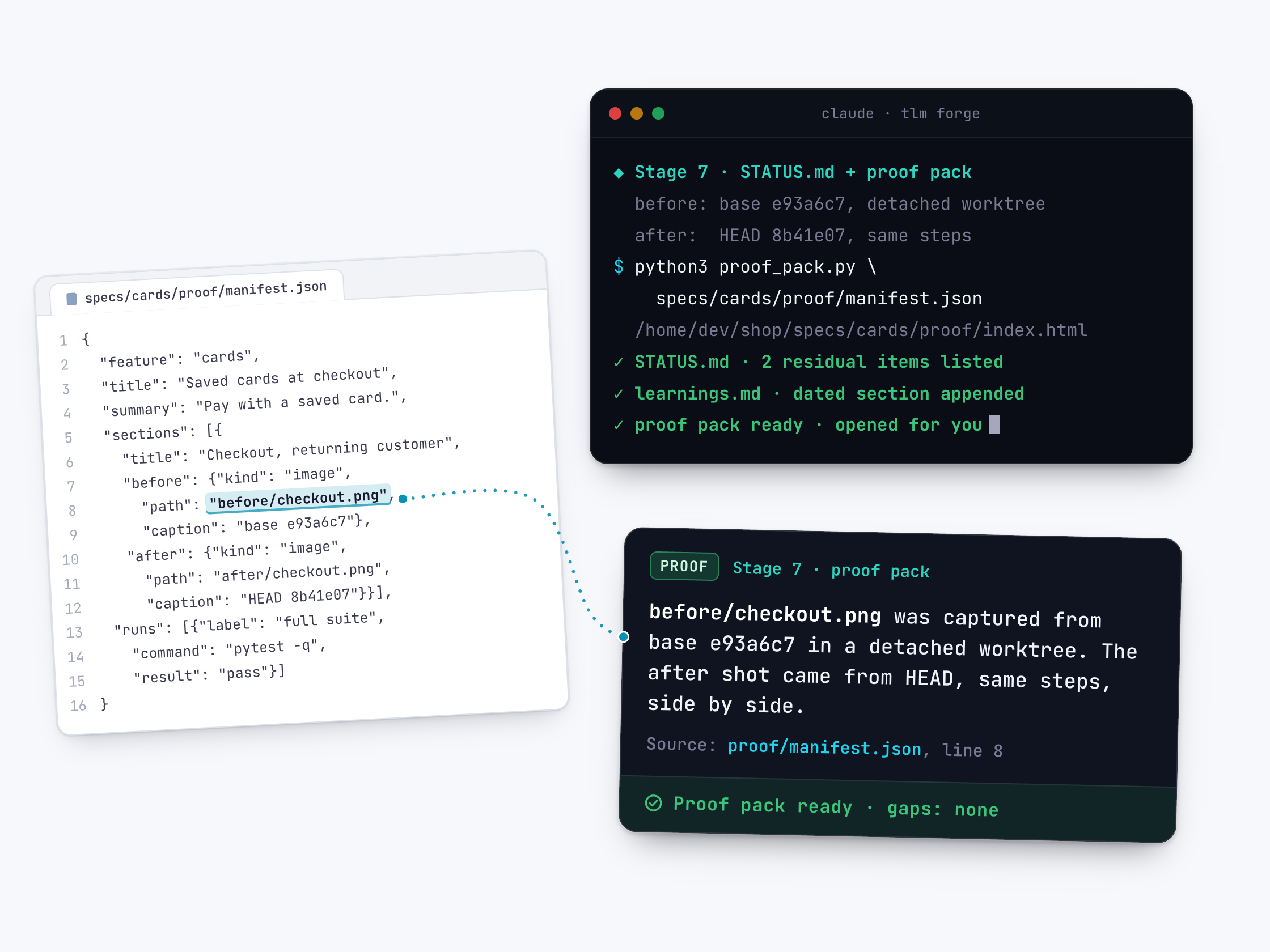
On demand
Extra tools and controls you use by simply asking Claude in plain English, whenever you want them.
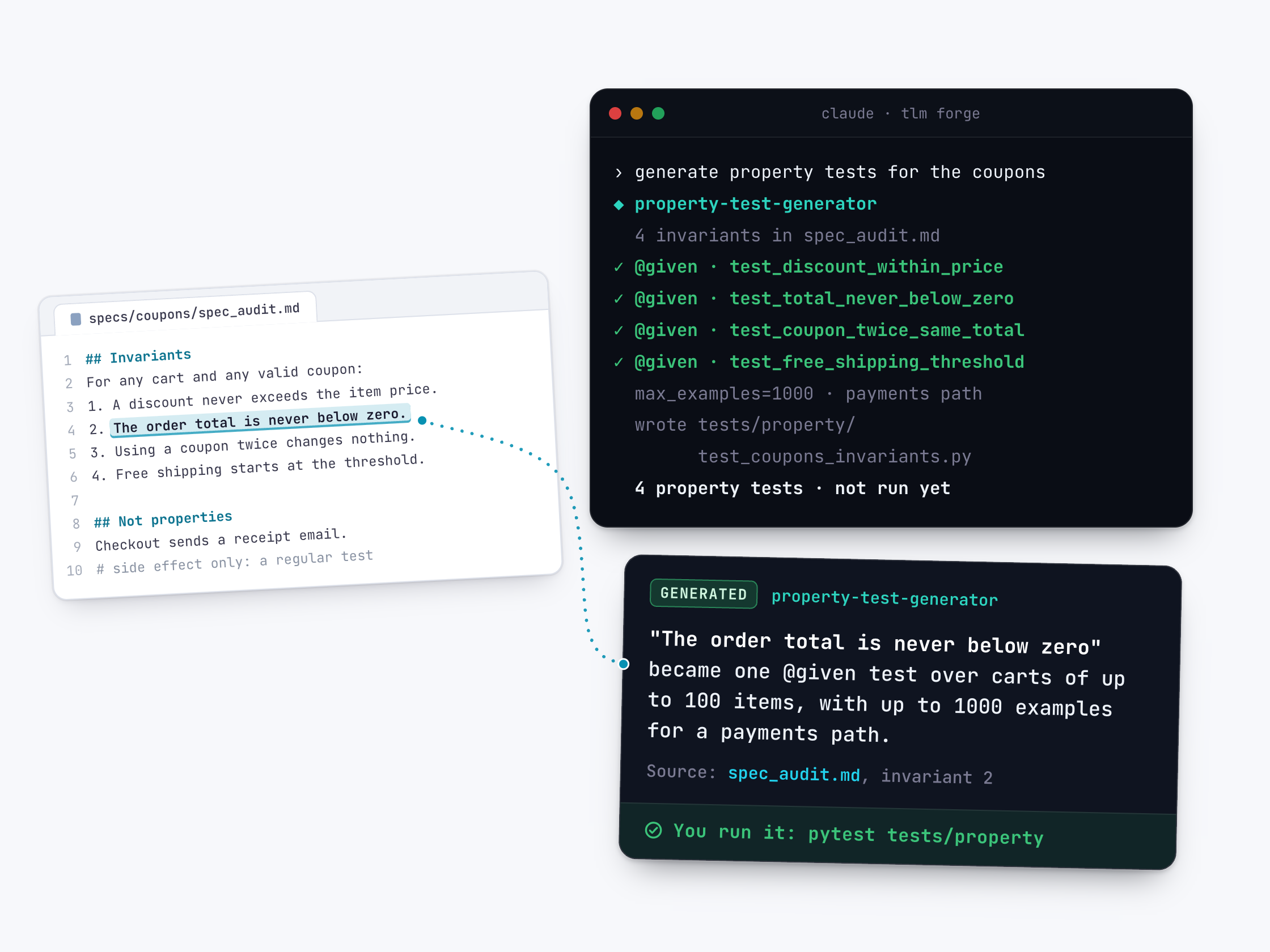
Tests that try many inputs to break your rules
Tell Claude the rules your code must always follow, and it writes Python tests that throw many generated inputs at each rule. These tests can find odd cases you would never list by hand. Claude writes the test file and you run it.
Read the documentation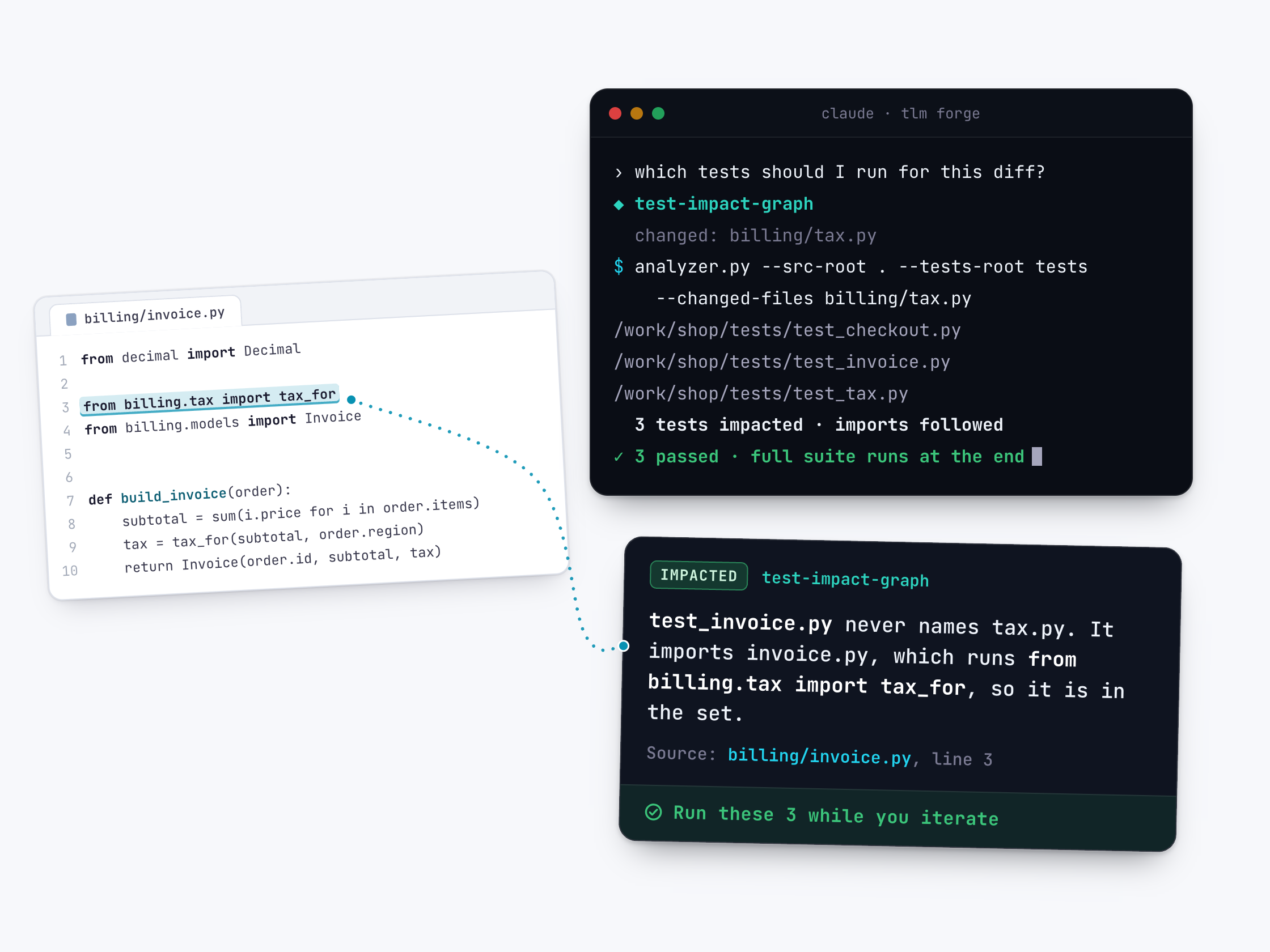
Run only the tests your change can affect
Claude maps which Python files import which, then lists only the test files your change can reach. During a build, TLM Forge tells Claude to run just those while it works, and every test at the end. You can also ask for the list any time.
Read the documentation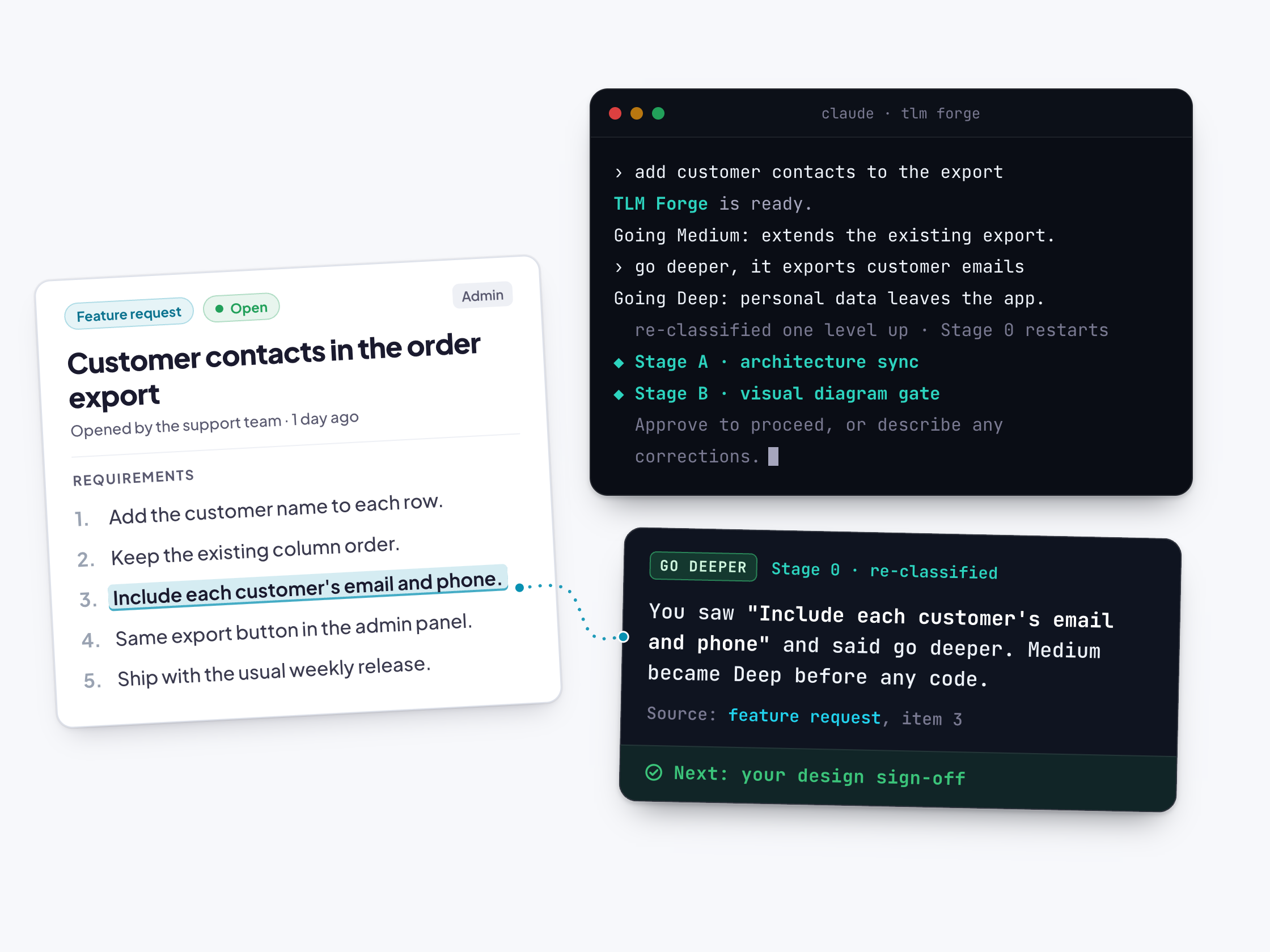
You stay in control of every run
TLM Forge makes the calls, but you can change them in plain words. Say "go deeper" or "go lighter" to change how much process runs, approve or correct the design when it is shown, say "pause for review" to stop and read findings, or use an override to get past a check.
Read the documentationBuilt for teams
Features for teams: a written record of every decision on a GitHub issue, and checks that make sure the design step really happened.
One GitHub issue records every design and decision
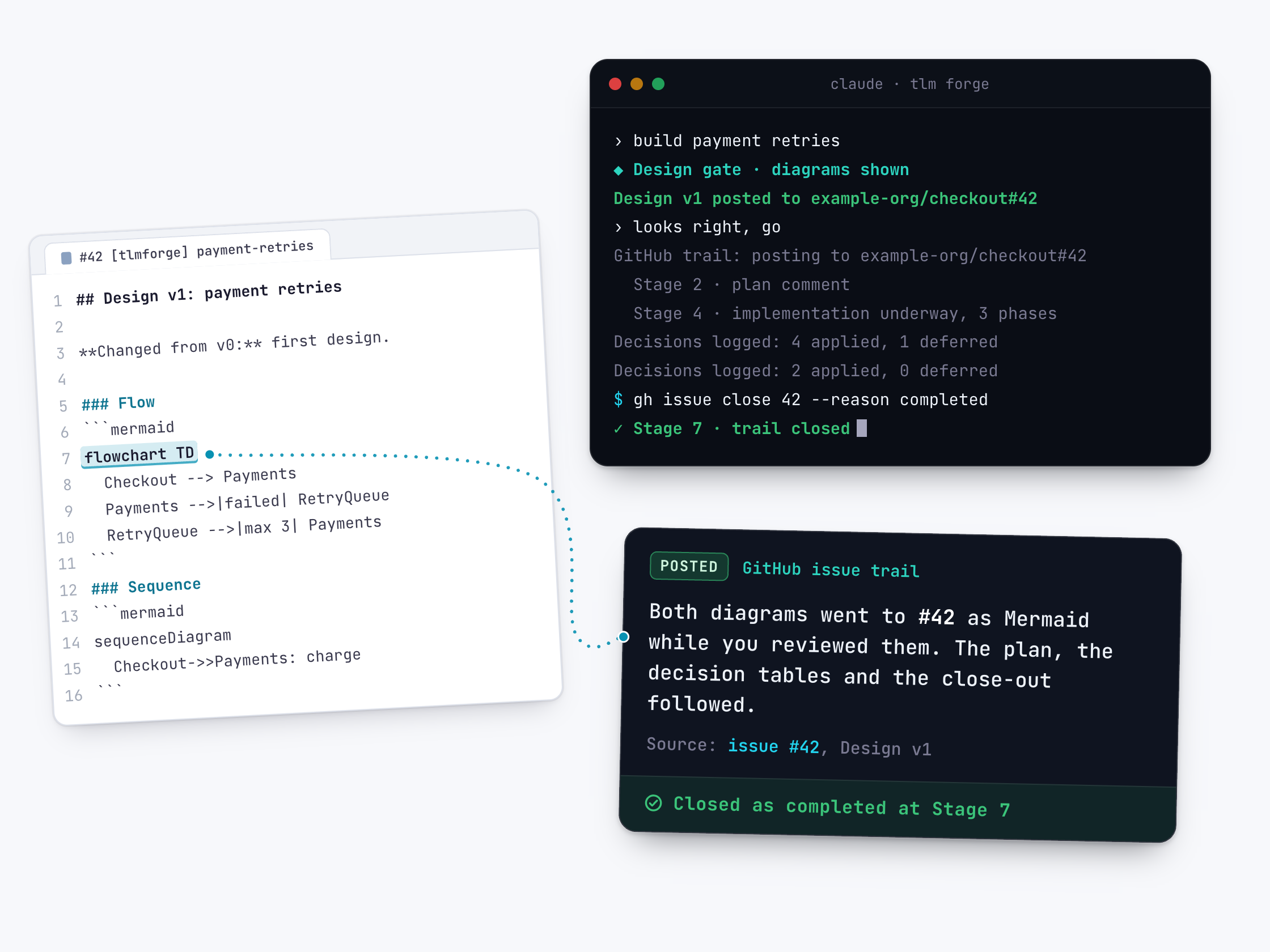
On Medium and Deep work, TLM Forge keeps one GitHub issue per feature up to date. The design diagrams, the plan, the decisions and a final summary are posted there as the work happens. Your team can follow along without asking.
Read the documentation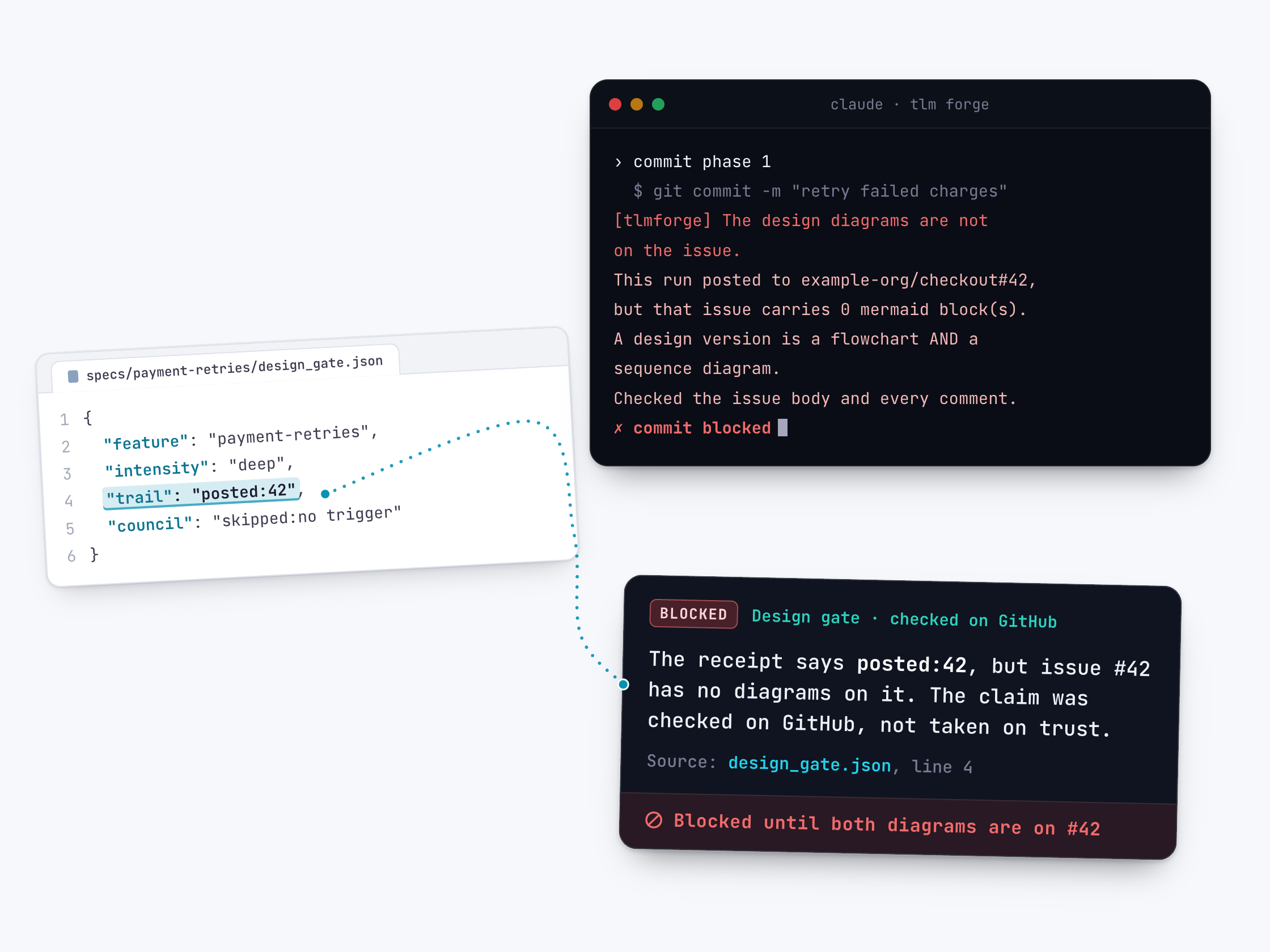
Before a commit, GitHub must confirm the design
During Medium and Deep work, Claude writes a small note saying the design was shown and posted to GitHub. Before any commit, push or merge, a built-in check compares that note with the real GitHub issue. If GitHub cannot confirm it, the commit is blocked.
Read the documentation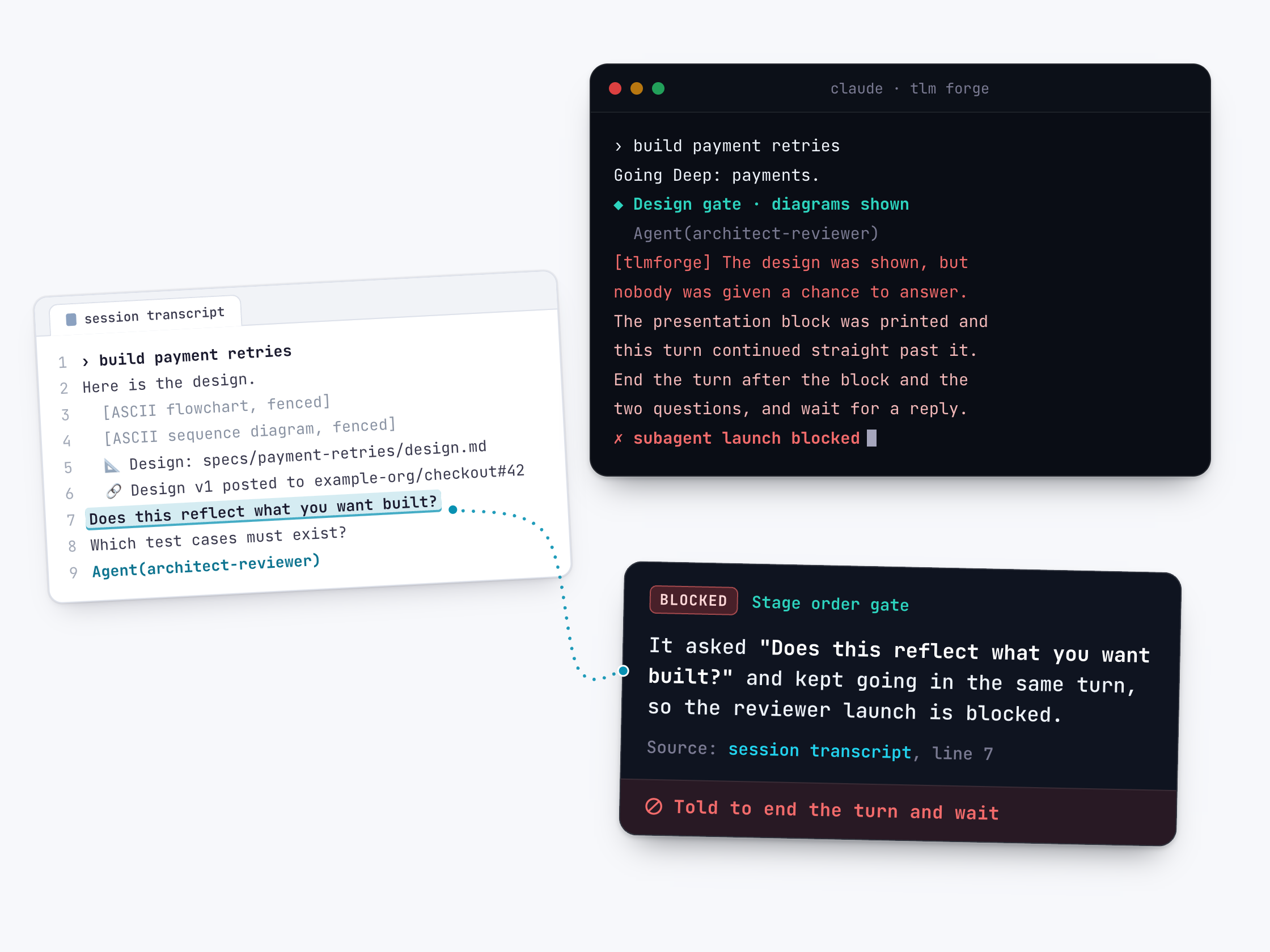
The build pauses after the design so you can answer
On Medium and Deep work, TLM Forge shows you the design and should then stop for your reply. On Pro, a built-in check enforces that stop. Until there is an entry from you after the design, Claude is blocked from launching subagents (helpers such as reviewers) or editing files outside specs/ and docs/, where the design documents live.
Read the documentationThe review council
Eight specialist AI reviewers. Each one looks at your work for one kind of problem only, starting fresh without the conversation that produced the code, so it judges the work rather than the intentions behind it.
A senior design reviewer for Claude's plans
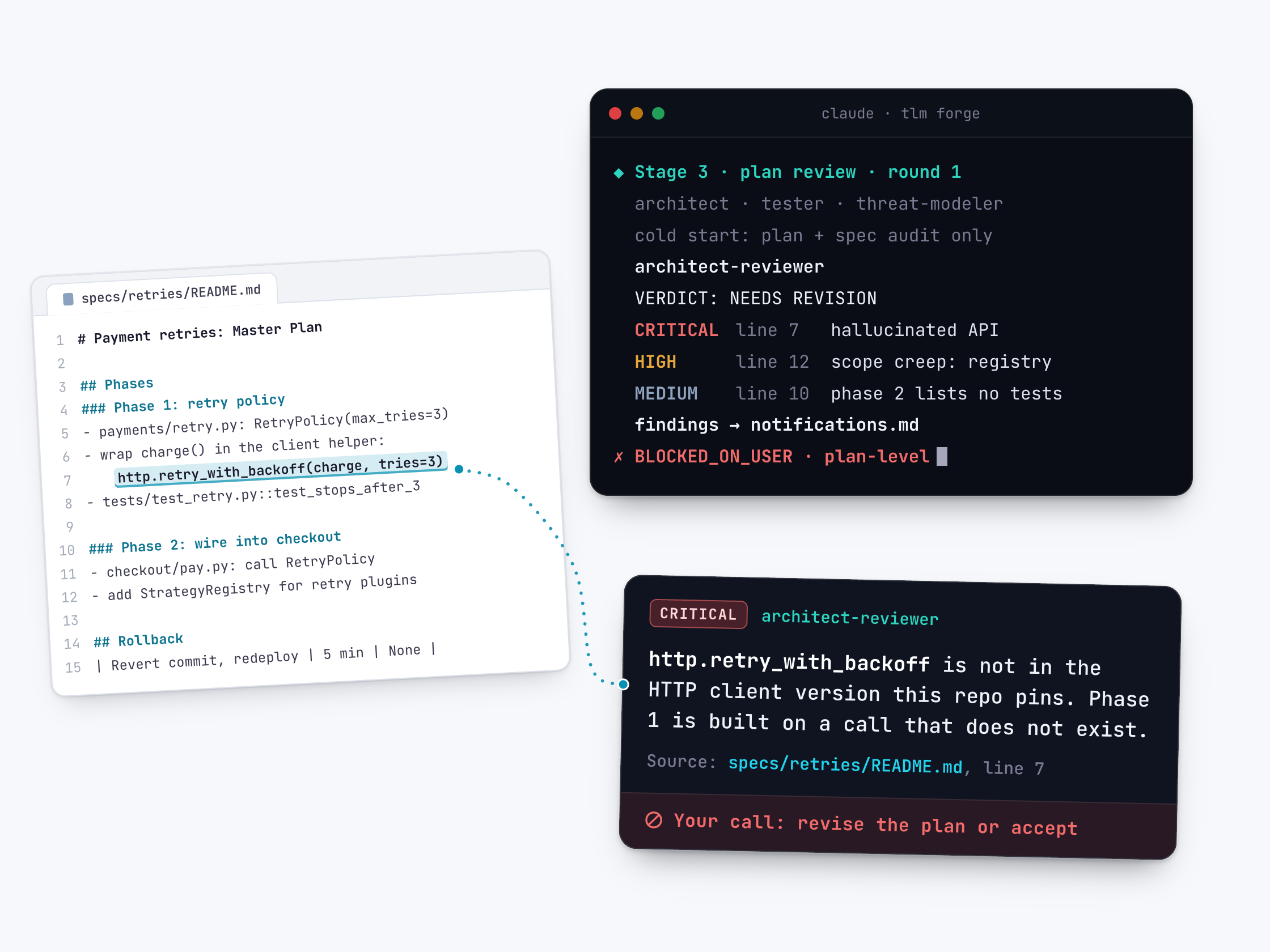
On bigger tasks, this agent writes the plan for the change, and a fresh copy of it then reviews that plan. It hunts for made-up functions, invented libraries, needless complexity and work nobody asked for. On Deep work, such as a new feature, it also checks the finished change at the end.
Read the documentation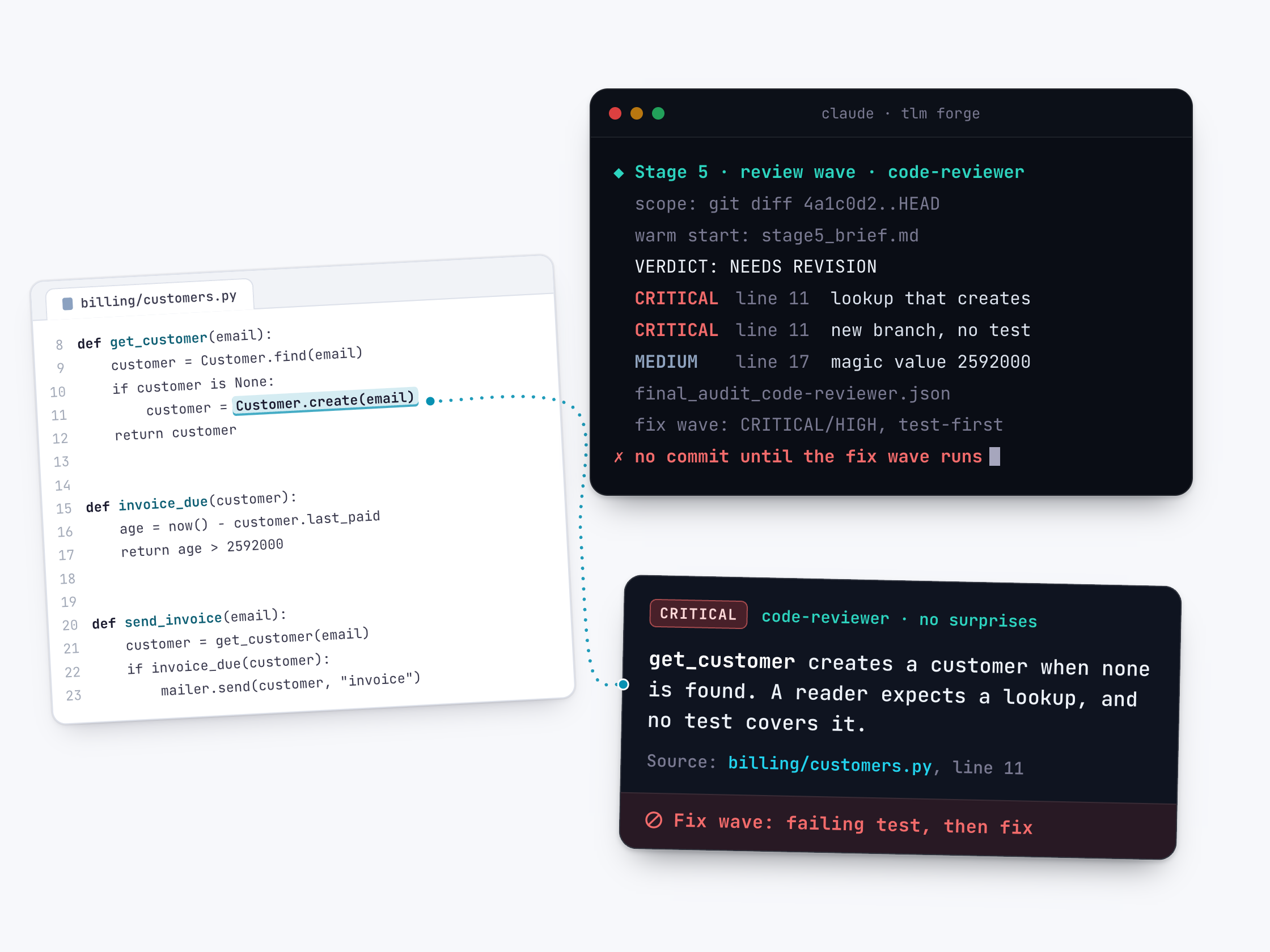
A code reviewer that reads the code around the change
The code-reviewer checks the finished change the way a careful senior engineer would. It wants tests for every change, code that does what its name says, and new code that fits your repo's existing patterns. It runs once, at the final review, and matches every changed file to its tests.
Read the documentation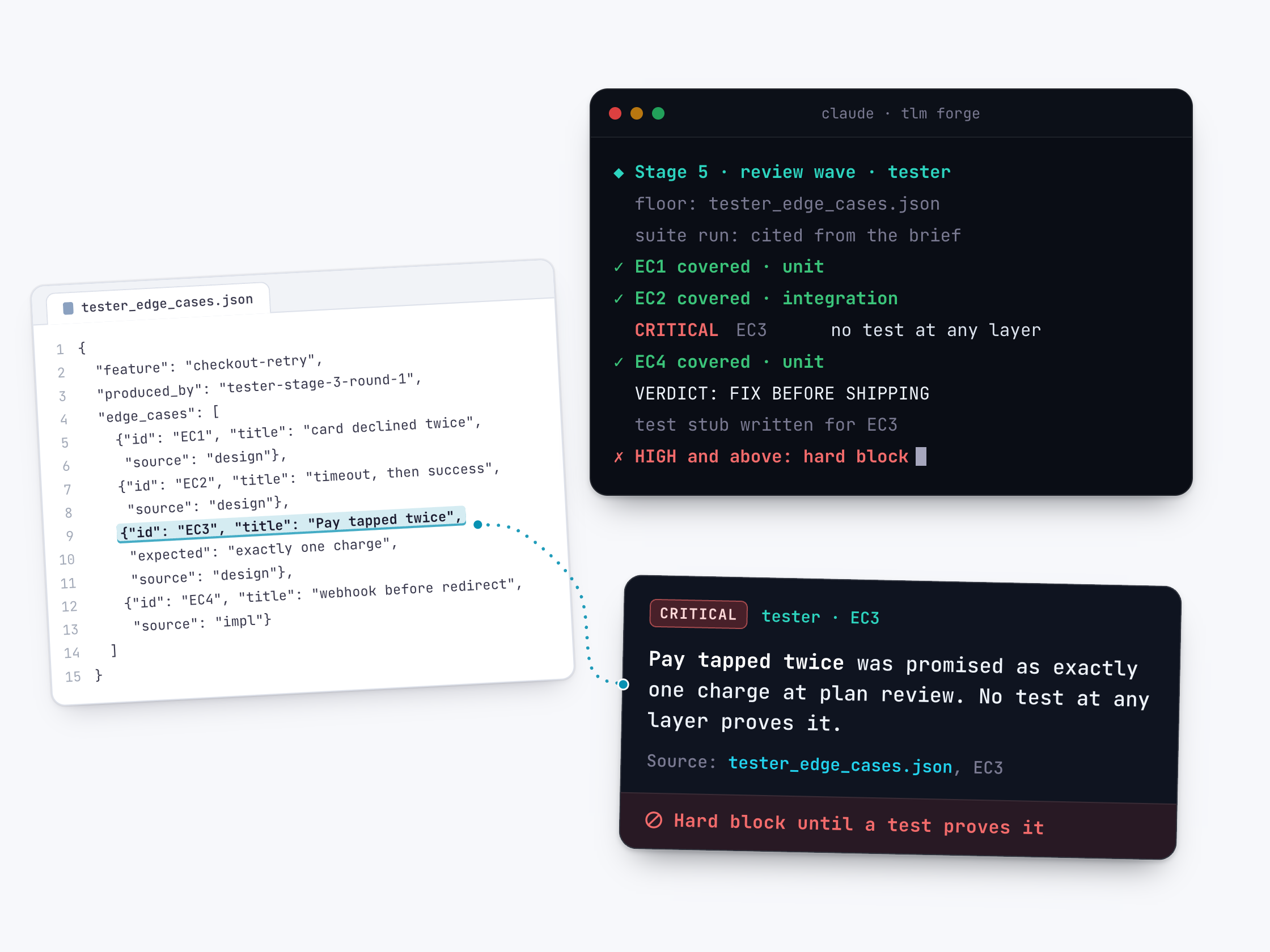
A tester that asks "what happens when..." for every change
The tester has one job: find what can go wrong, and make sure a test proves it won't. It reviews the plan on Medium and Deep work. On Deep work it also writes down the edge cases the build must test, then checks at the final review that each one really has a test.
Read the documentation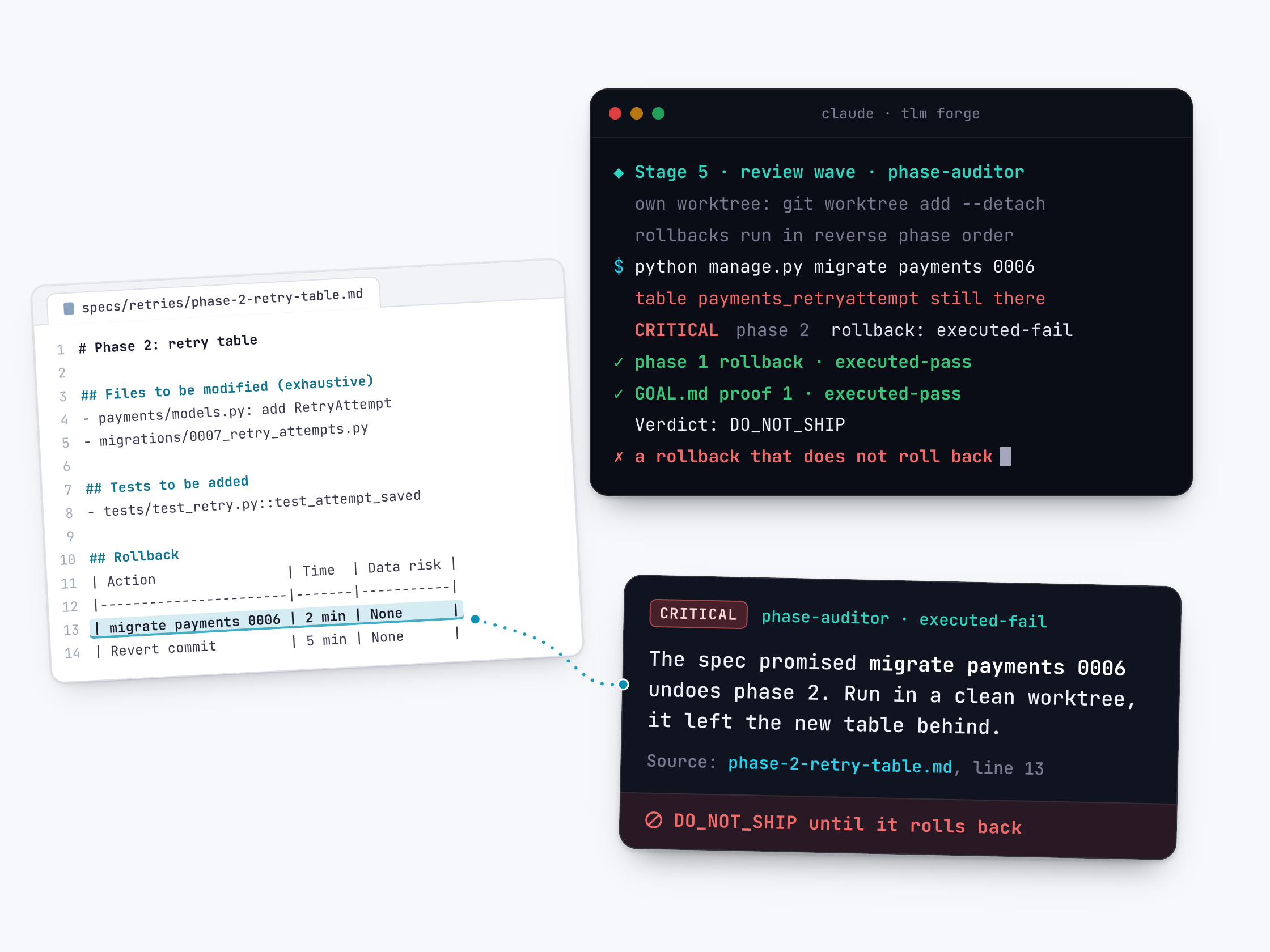
An auditor that runs your undo steps, not just reads them
The phase-auditor checks one thing: did Claude deliver exactly what each part of the plan promised? It compares the promised files, tests and checks against what actually changed. Then it runs every undo step itself, in a separate copy of your repo. An undo step that does not undo is a critical finding.
Read the documentation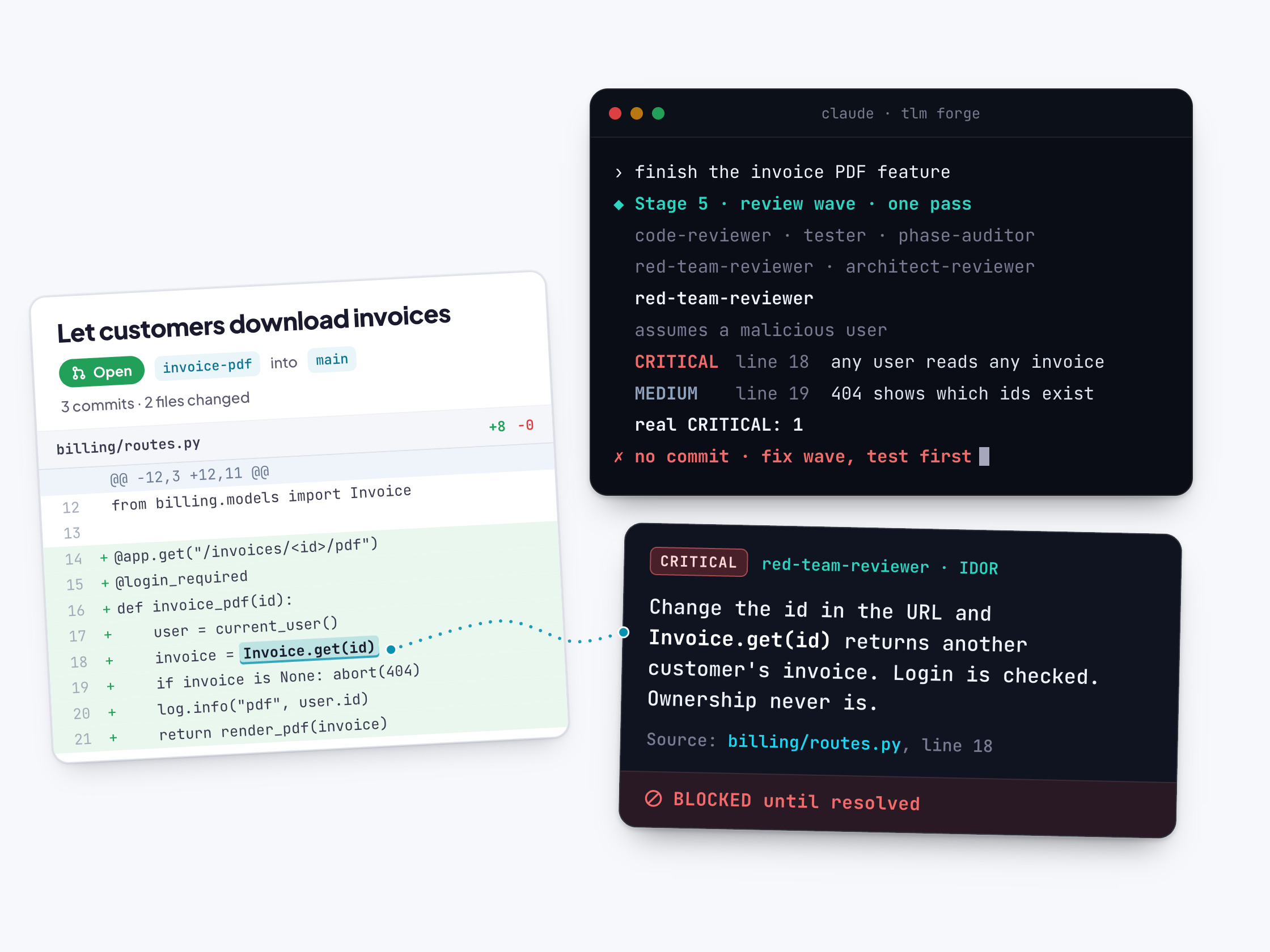
A last check that attacks your code like a hacker would
On Deep work, this reviewer reads your finished code as a malicious user who knows it well. It looks for real ways in, such as one customer reading another customer's data. Every top-severity finding must name the exact file, the line and how the attack works.
Read the documentation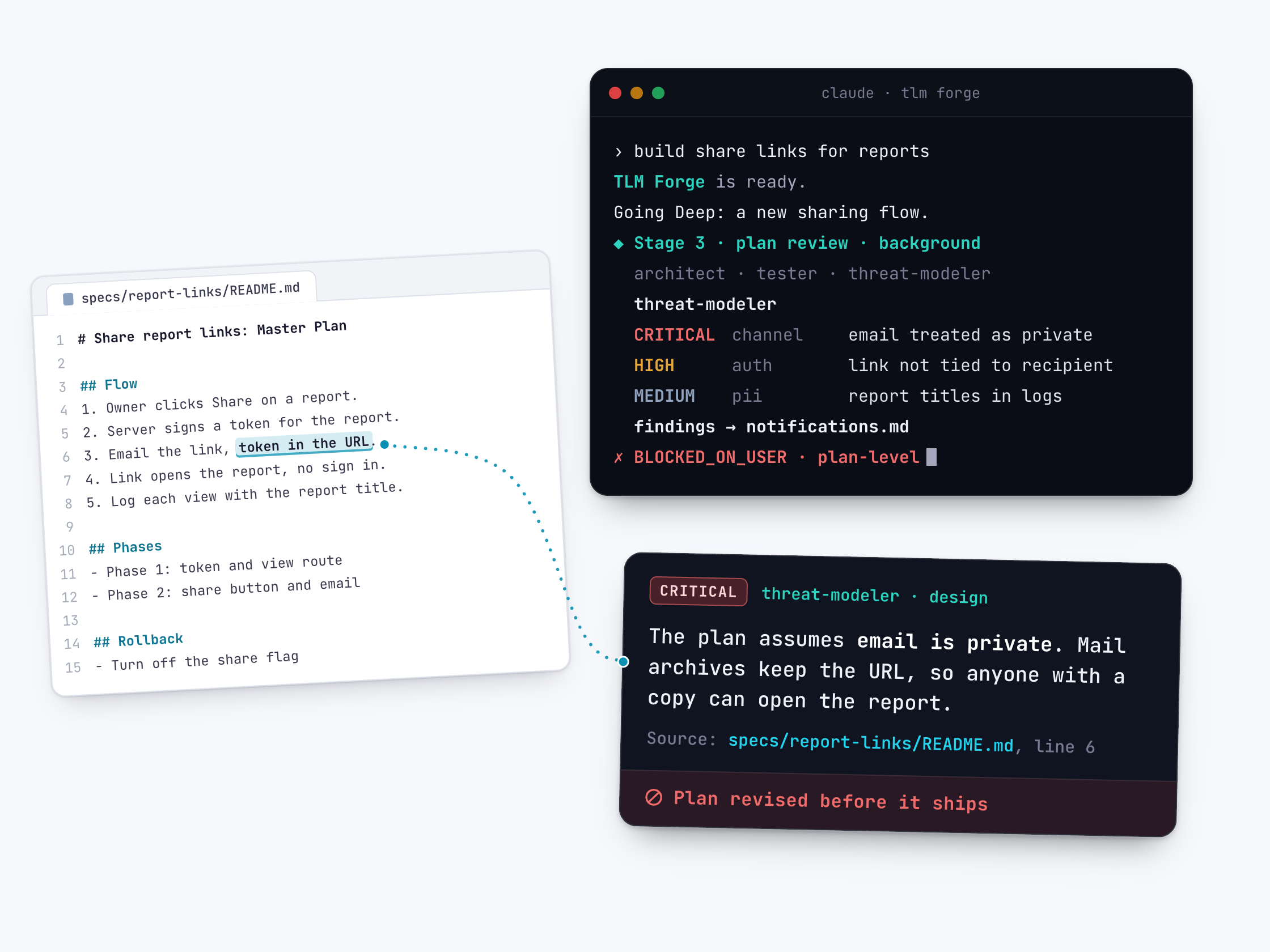
Spot security mistakes baked into the plan itself
On Deep work, this reviewer reads the written plan as the build begins. It asks one question: what does this design take for granted that an attacker could break? Caught early, the fix is usually a plan change, not a rewrite.
Read the documentation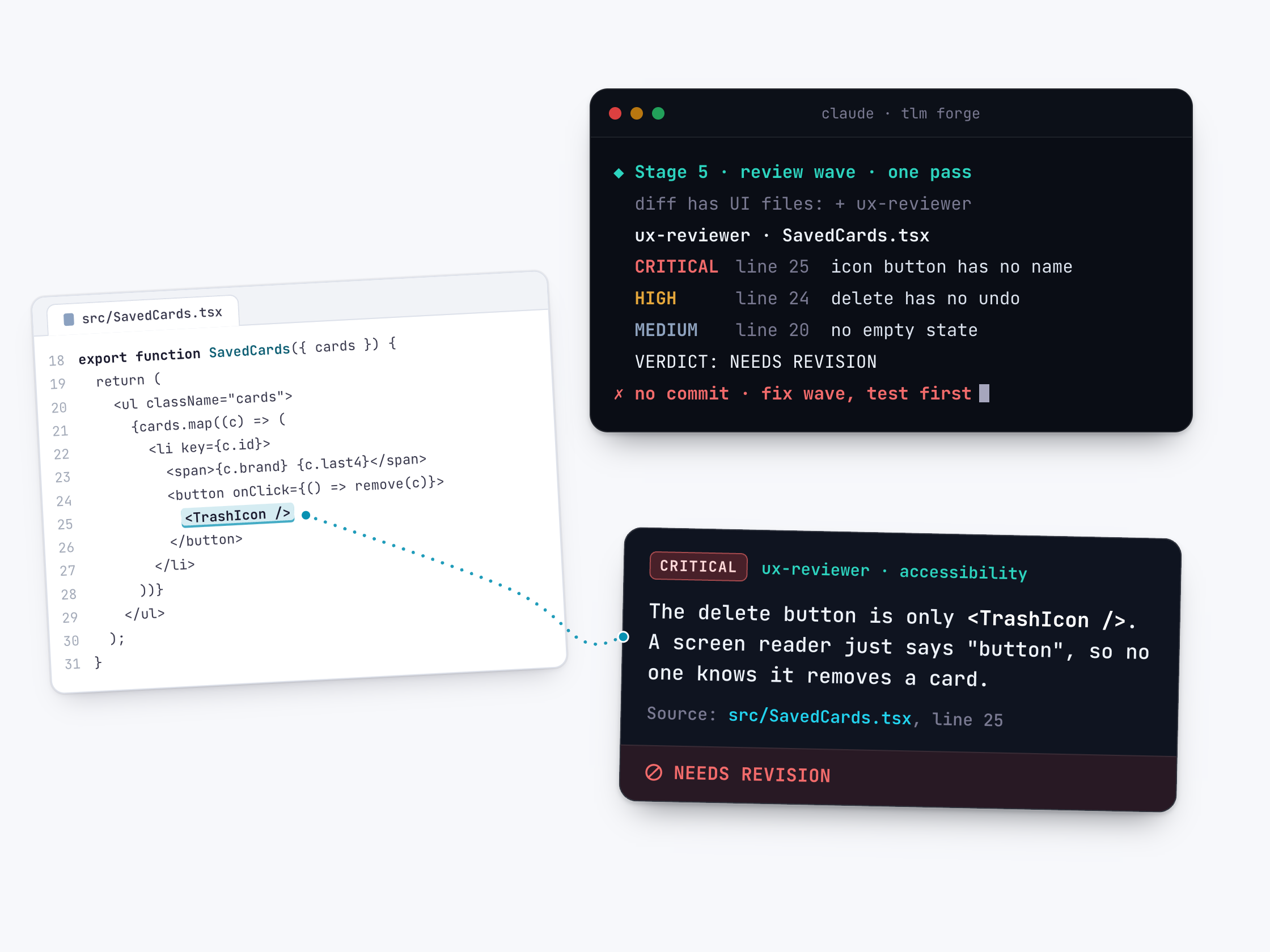
Catch accessibility and design slips on changed screens
When a task changes what users see, TLM Forge adds a reviewer for the screens. It looks for buttons a screen reader cannot name, missing empty or error states, and broken platform rules. Each issue comes with the file, the line and a fix.
Read the documentation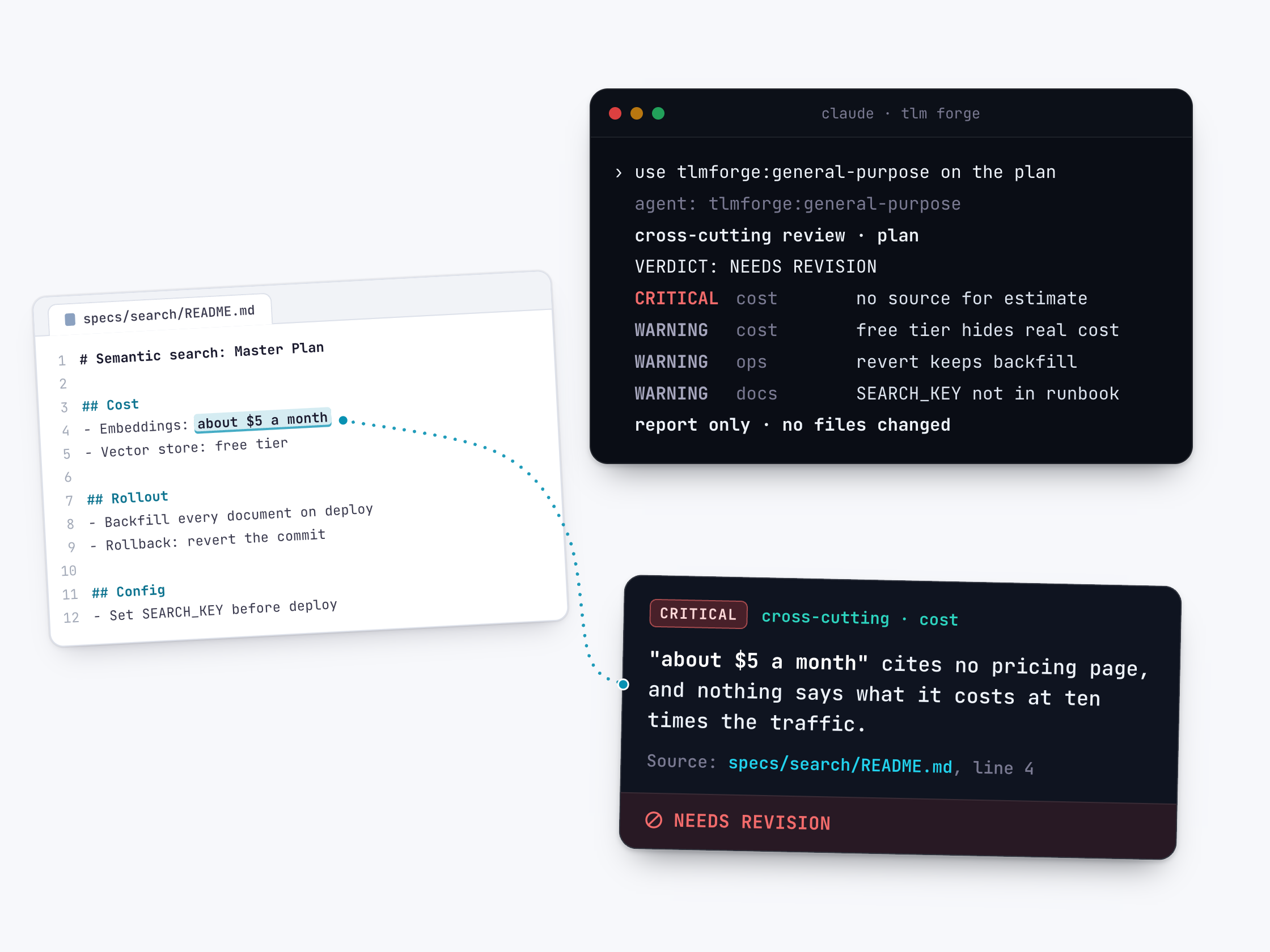
An on-request check for cost, deployment and docs
This reviewer checks a plan for what the specialist reviewers skip: cost guesses with no source, deployments nobody else could run, and docs that do not match the code. TLM Forge never starts it on its own. You run it by asking for it by name.
Read the documentation