Keeps the map of your system up to date
TLM Forge keeps a written map of how your code fits together. Before planning a Medium or Deep change, it checks which parts of your code changed since the map was last updated and rewrites only those parts. Planning and reviews then start from an accurate picture.
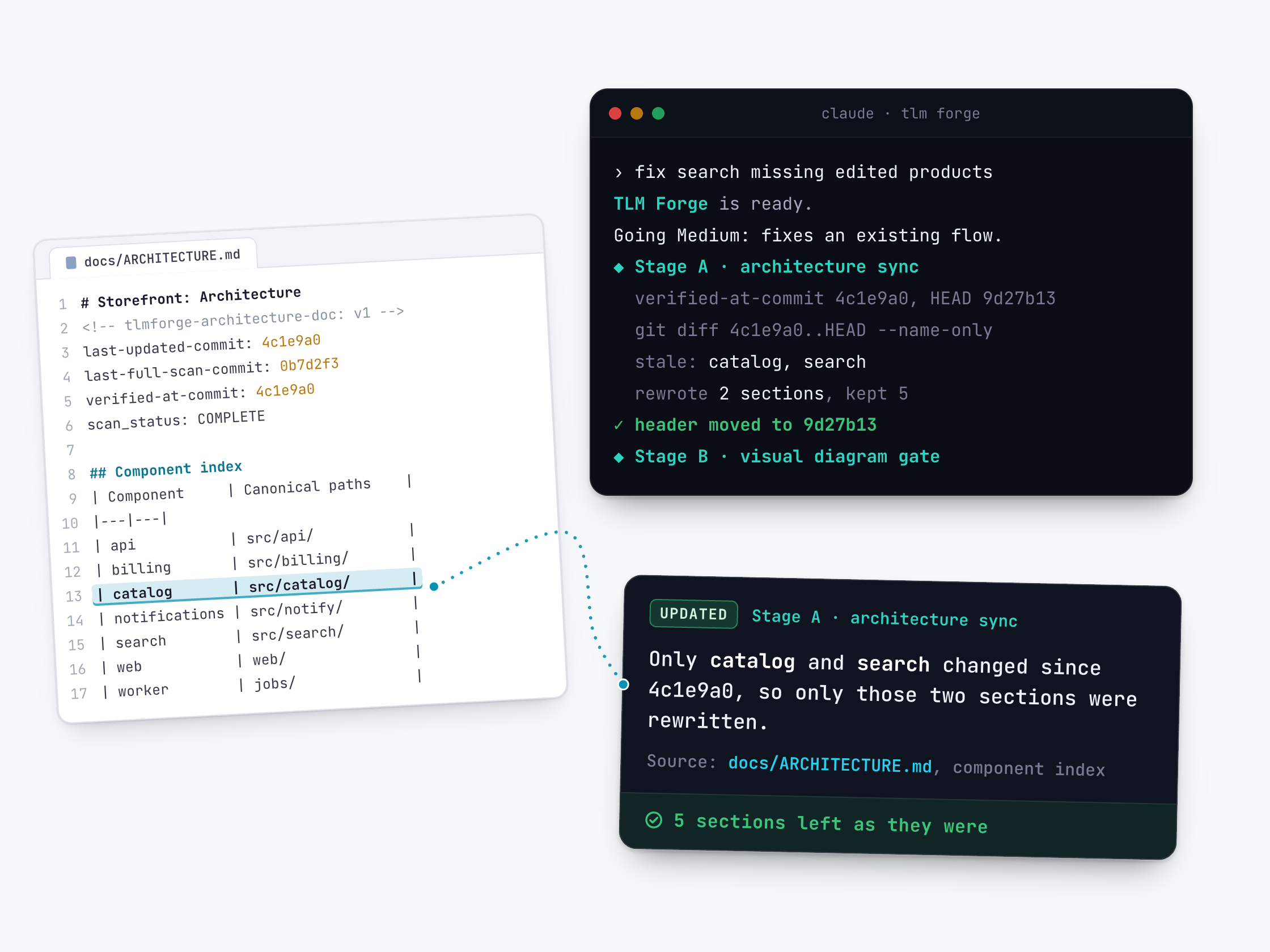
How to use it
/tlmforge:buildThis runs on its own on Medium and Deep work, after the understanding check and before the design drawings. Light work skips it. If your install includes the optional rebuild skill, you can also ask in plain English for a full rebuild, for example: "rebuild docs/ARCHITECTURE.md".
Words you will see on this page
- Architecture doc
- A file in your repo, docs/ARCHITECTURE.md, that describes the main parts of your system and how they connect.
- Component
- One main part of your system, such as checkout or search, tied to the folders where its code lives.
- Commit
- A saved snapshot of your code in git. The doc records which snapshot it was last checked against.
- Stale section
- A part of the doc whose code has changed since it was written, so it needs rewriting.
- Full re-scan
- Reading the whole codebase again instead of only the changed parts.
- Stage A
- This step. It runs after TLM Forge checks it understood you and before it shows you the design.
What it does in each situation
| Situation | What happens |
|---|---|
| Light work | Skipped. |
| No architecture doc yet | Writes a small starter doc covering only the parts this task touches, marked as partial. |
| Doc already checked against your latest code | Reads the top of the doc, sees it is current, and stops. |
| A few parts of your code changed | Rewrites only the sections for those parts and leaves the rest alone. |
| The change touches login and access, encryption, personal data, payments, sessions or database structure, or more than five parts are out of date | Updates every section. |
| The recorded snapshot is missing, or more than 200 files changed | Re-reads the whole codebase. |
Without TLM Forge vs with TLM Forge
| Without TLM Forge | With TLM Forge | |
|---|---|---|
| Keeping the doc current | Someone has to remember to update it. | Refreshed as part of normal work, right before it is used. |
| Cost of each check | Re-read everything, or trust an old doc. | Read the top of the doc, then only the changed parts. |
| A brand new repo | Needs a documentation project first. | Gets a small doc on the first task that grows over time. |
What it does
Every later step relies on an accurate picture of your system. The design drawings are made from it, the planner reads it, and the reviewers check the plan against it. An out-of-date map is worse than none, because people trust it. This step keeps docs/ARCHITECTURE.md current as part of normal work, so it is right at the moment it is about to be used.
The top of the doc records the code snapshot (commit) it was last checked against, plus a list of the main parts of your system and where their code lives. TLM Forge reads only that top section first. If the doc was already checked against your latest code, it stops. Otherwise it lists the files changed since the last update, works out which parts they belong to, and rewrites only those sections.
Some changes are too broad for a small update. If a change touches login and access, encryption, personal data, payments, sessions or database structure, or more than five parts are out of date, every section is updated. If there is no doc yet, TLM Forge writes a small starter doc for just the parts this task touches, which grows as later tasks reach new areas.
How it works, step by step
Make sure a doc exists
If there is no architecture doc, TLM Forge writes a small one covering only the parts this task touches, without reading the whole repo.
Read only the top
It reads the header and the list of parts. If the doc was already checked against your latest code, this step is done.
Find what changed
It lists the files changed since the last update and matches each one to a part of your system. Those parts are marked out of date.
Widen the update when needed
Sensitive changes, or more than five out-of-date parts, update every section. A missing snapshot or more than 200 changed files means a full re-read.
Rewrite only the out-of-date sections
Each out-of-date section is rewritten from your current code. Everything else stays as it was.
Record the check
The header is stamped with your latest snapshot. Even when nothing changed, it records that the check ran.
What it looks like
The top of the architecture doc that this step keeps current, followed by the short summary printed after a full rebuild. The format is real; the project name and values are made up.
# Storefront: Architecture
<!-- tlmforge-architecture-doc: v1 -->
last-updated-commit: 9d27b13...
last-full-scan-commit: 0b7d2f3...
verified-at-commit: 9d27b13...
scan_status: COMPLETE

docs/ARCHITECTURE.md written.
  Components found: 7
  Commit anchored: 9d27b13
  Lines: 214
Why it is better
Accurate exactly when it matters
Without TLM Forge, the design is based on whatever the doc said when someone last updated it. With it, the doc is refreshed right before the design and plan are made.
Cheap on every run
Without TLM Forge, staying accurate means re-reading the whole codebase. With it, only the top of the doc and the changed parts are read, and if nothing changed the check ends there.
Grows with your work
Without TLM Forge, you need a documentation project before you start. With it, a new repo gets a small doc on its first task and it fills in over time.
Sensitive changes get the full picture
Changes that touch login and access, encryption, personal data, payments, sessions or database structure refresh every section, not just the touched ones.
Good to know
- Light work skips this step entirely.
- A full rebuild, where your install offers it, replaces the whole doc. This step is the small, incremental version. Ask for a rebuild only when you want a clean slate, such as after a major refactor.
- On large repos (more than 500 files, or more than 50 top-level folders), a full rebuild reads only the main entry files and widely shared code, and marks the doc as partial.
- If git history was rewritten and the recorded snapshot no longer exists, TLM Forge logs a warning and carries on without blocking you.
- If your install does not include the rebuild skill, this step still creates a starter doc on its own.