Commits and pushes pause if code changes after review
When the final review finishes, TLM Forge records exactly which version of your code it checked. If code changes after that, a check built into the plugin stops Claude from committing, pushing or merging until the new code gets a short review. Notes and reports in the specs/ and docs/ folders still go through.
How to use it
/tlmforge:buildRuns on its own. A check built into the plugin looks at every shell command Claude runs. It is active on Medium and Deep work from the moment the final review (Stage 5) records the commit it checked until the wrap-up stage (Stage 7) closes the feature.
Words you will see on this page
- Final review (Stage 5)
- The last round of reviewer agents that read the finished change on Medium and Deep work.
- Commit, SHA and HEAD
- A commit is a saved snapshot of your code, its SHA is the unique ID git gives it, and HEAD is the latest commit you are on.
- Hook
- A small check built into the plugin that runs automatically before Claude's shell commands.
- Re-review (PSR)
- A short review where one reviewer checks only the code that changed since the final review, for serious (CRITICAL or HIGH) problems.
- Accepted residual
- On Pro, your recorded OK to ship with a known list of leftover, less serious issues.
- Medium and Deep
- TLM Forge's two fuller settings: Medium fixes or improves existing behavior, Deep adds something new or changes a security decision.
What passes, what is blocked, and how to get past the block
| What happened | Result | How to get past it |
|---|---|---|
| Your latest commit is the one the final review checked | Passes | Nothing needed |
| Only notes or reports changed (.md, .json or .txt in specs/ or docs/, or learnings.md) | Passes | Nothing needed |
| Any other file changed, including scripts/, executables or symlinks | Blocked | Claude runs a short re-review of just the new changes |
| Code changed and you accept the known leftover issues (Pro) | Blocked until recorded | Say so in chat; Claude saves your own words and the plugin checks you sent them |
| Code changed again after a re-review or an acceptance | Blocked | Another short re-review of the newer code |
| You want to skip the check | Passes | Say "be quick", "just do it" or "trivial fix", or set TLMFORGE_HOOKS=0 |
| gh pr create or any other command | Passes | Not checked |
| Plugin error, no active feature or no review records | Passes | Not checked; the plugin lets it through |
What it does
A commit is a saved snapshot of your code, and git gives each one a unique ID called a SHA. When the final review (Stage 5) finishes, each reviewer writes down the SHA it checked. Before Claude runs git commit, git push or gh pr merge, the plugin compares your latest commit with the reviewed one. If they match, the command runs. Opening a pull request with gh pr create is not checked.
A newer commit alone does not cause a block. If every change since the review is documentation, the command passes. Documentation means a .md, .json or .txt file inside specs/ or docs/, or the learnings.md file at the project root. Everything else counts as code, including anything in scripts/, executable files and symlinks. For git commit, changes you have not committed yet count too. If the plugin cannot tell what changed, it treats it as code.
When code did change, there are three ways forward. Claude can run a short re-review: one reviewer looks only at the new changes and reports only serious problems. On Pro, you can accept the known leftover issues in chat, and Claude saves your own words in a file the plugin checks against your messages. Or you can switch the check off yourself, as described below.
How it works, step by step
The review records its commit
Each final reviewer saves the SHA of the exact code it checked.
Claude tries to commit, push or merge
The plugin checks the command before it runs. Any other shell command passes untouched.
The commits are compared
If your latest commit is the reviewed one, the command runs. If not, the plugin checks whether only documentation changed.
The ways through are checked
An override phrase in your latest message, a re-review of the current commit, or on Pro your recorded acceptance lets the command through.
Otherwise the command stops
The plugin blocks the command and explains how to unblock it, so Claude runs the short re-review instead of pushing.
What it looks like
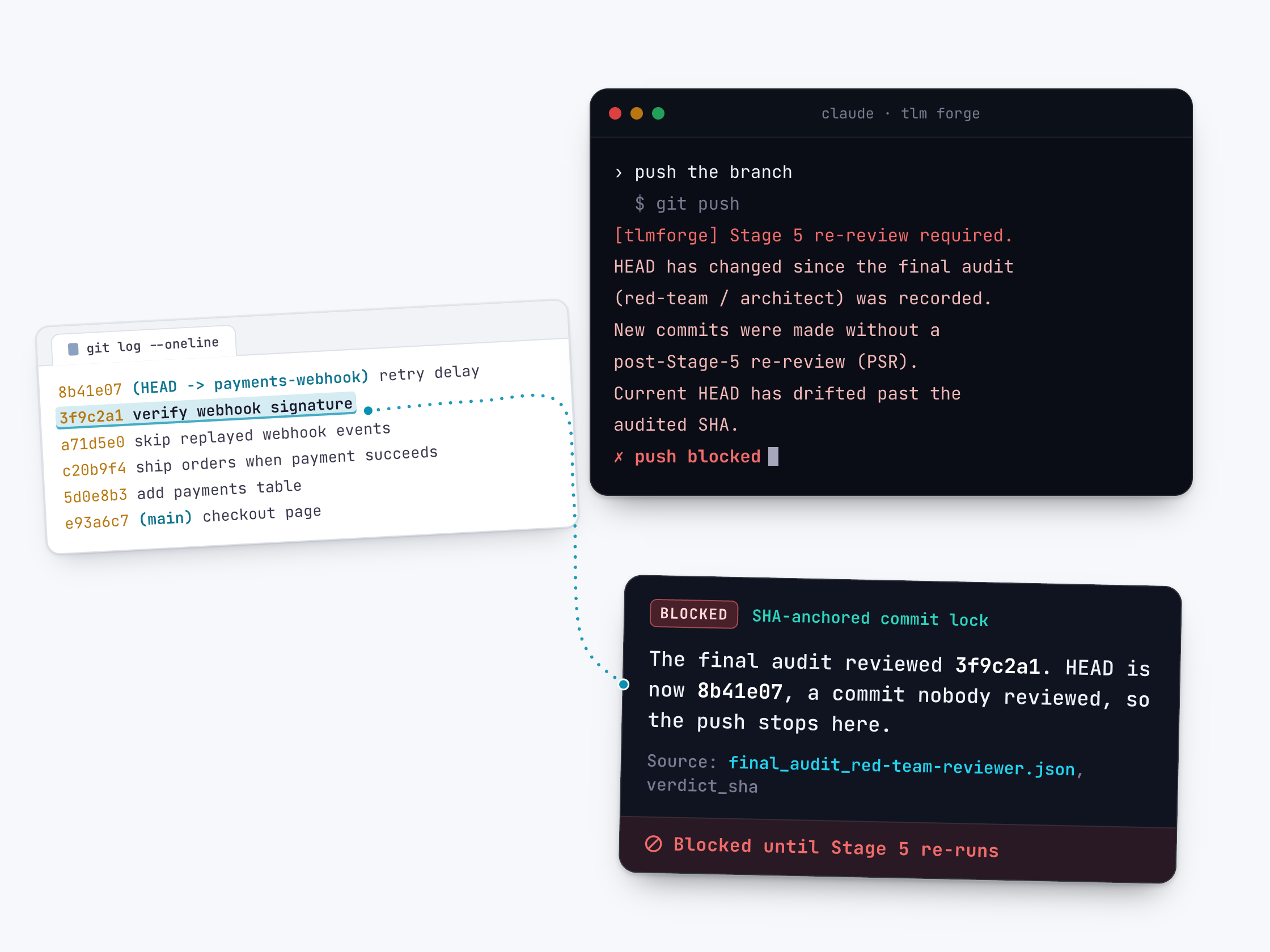
What Claude sees when it tries to push code that changed after the final review. HEAD means your latest commit, and PSR is the short re-review. (From the plugin's check, with some lines shortened or left out.)
$ git push
[tlmforge] Stage 5 re-review required.
HEAD has changed since the final audit (red-team / architect) was recorded,
and the drift is not docs-only (code, an executable, a symlink, scripts/, or a
change outside specs/, docs/ and the root learnings.md).
To unblock, one of:
  (a) Run a PSR scoped to the delta, ONE reviewer, regression-only, and save it as:
        specs/<feature>/agent_verification/final_audit_<role>_psr_<HEAD>.json
  (b) Set TLMFORGE_HOOKS=0 to bypass enforcement for this session.
  (c) Record an accepted residual, after the USER has accepted the residual list.
Why it is better
Reviewed means this exact code
Without TLM Forge, "it was only a small tweak" can slip unreviewed code into a push. With it, the plugin compares commit IDs, so that code stops unless you override the check.
Notes do not trigger a re-review
Without a documentation exception, every status note written after the review would demand another review. With TLM Forge, notes and reports in specs/, docs/ or learnings.md pass on their own.
A short re-review, not a full one
Without it, the safe option is rerunning the whole final review. With TLM Forge, one reviewer checks just the new changes for serious problems.
Accepting risk is on the record
Without a record, it is unclear who decided to ship known issues. On Pro, the plugin checks that the words in the acceptance file appear in a message you actually sent.
Good to know
- To skip the check, set TLMFORGE_HOOKS=0 (or false, no, off) for the session, or put "be quick", "just do it" or "trivial fix" in your message. Only your newest message is read, so the phrase may be missed if Claude has run other tools since you sent it.
- If the plugin hits an error, or finds no git repository, no commits, no active feature or no review records, it lets the command through. It guards against unreviewed changes; it is not a security barrier.
- Only git commit, git push and gh pr merge are checked. Opening a pull request with gh pr create is not.
- The accepted-residual option is Pro only and needs a plugin version whose check supports it. Older versions offer only the re-review and TLMFORGE_HOOKS=0, and their message asks for two reviewers, though one re-review file for the current commit still unblocks.
- The lock ends when the wrap-up stage (Stage 7) closes the feature. Resuming the feature later turns it back on.