Shows you the design and waits for your OK
Before any code is written, TLM Forge draws two simple diagrams of how the change will work. On Medium and Deep work it waits for your reply, then asks you to sign a short written goal with a clear definition of done. On Pro, a check built into the plugin enforces the wait.
How to use it
/tlmforge:buildThis runs on its own at every level. On Medium and Deep work it comes right after the map of your code is refreshed, and it stops twice: once for the diagrams and once to sign the goal. On Light work it comes right after the level is picked, and the diagrams print with no stop. The design council runs only on Deep work, and only when triggered.
Words you will see on this page
- Flowchart and sequence diagram
- Two text drawings: one shows which parts of your system the change connects, the other shows the steps in order.
- Goal contract (GOAL.md)
- A short file with the goal, what is out of scope, and how each part of done will be proven, which you sign.
- Exit criteria
- The numbered checks that must pass before the work counts as done.
- Design council
- An optional group of AI helpers that propose and rank other designs before you see Claude's, used only on Deep work.
- Light, Medium, Deep
- The three levels of checking TLM Forge picks from, based on how big and risky your change is.
- Pro
- The paid TLM Forge plan, which adds checks built into the plugin that block the next step until you reply.
What you get on Light, Medium and Deep
| Light | Medium | Deep | |
|---|---|---|---|
| Design diagrams | Yes, printed, then work continues. | Yes. | Yes. |
| Waits for your OK on the design | No. | Yes. | Yes. |
| Signed goal contract (GOAL.md) | No. | Yes. | Yes. |
| Design council | No. | No. | Only when triggered. Off by default. |
| Wait enforced by the plugin | No wait to enforce. | On Pro. | On Pro. |
The design council's three answers
| Answer | What it means | What happens next |
|---|---|---|
| Converged | The council agrees on the design. | You see it and approve it as usual. |
| Revise | The design needs changes. | Claude applies the changes, then another round runs, up to the limit (two rounds by default). |
| Deadlock | The council cannot agree. | The run stops and asks you. The same happens if it still says revise at the round limit. |
What it does
The most expensive bug is building the wrong thing well. This step shows you the design while it is still free to change. Claude draws a flowchart of the parts of your system the change connects, and a sequence diagram of the one to three main steps it adds or changes. Both are plain text, printed in your terminal, with links to the full design and, if you use the GitHub trail, the matching GitHub issue.
On Medium and Deep work this is an agreement, not a glance. At the first stop Claude asks: does this match what you want, and which test cases must exist? At the second, it writes GOAL.md: one goal, what is out of scope, and numbered checks that define done, plus your test cases word for word. Once you sign, TLM Forge treats it as fixed. Your tests are written first, and any unmet check is reported as unmet.
On Deep work an optional design council can challenge the design first. It is off unless you turn it on, the work is brand new for this repo, or new scope appears mid-build. By default three councillors each propose an approach without seeing Claude's draft. Fresh agents rank them all with names hidden, and a chairman, told never to edit the design, answers converged, revise or deadlock. You still approve the result.
How it works, step by step
Draw two diagrams
Claude draws a flowchart and a sequence diagram. On Medium and Deep they come from the map of your code; on Light, from the changed files and their neighbors.
Draft the goal
On Medium and Deep work, Claude writes one goal, what is out of scope, and numbered checks for done, each with how it will be proven.
Challenge it, if the council is on
On Deep work with a trigger, councillors propose alternatives without seeing the draft, others rank them with names hidden, and a chairman gives one answer.
Stop 1: show the design and ask
The diagrams print, followed by two questions: does this match what you want, and which test cases must exist? Claude then waits.
Stop 2: sign the goal
Claude writes GOAL.md with your test cases word for word and asks you to sign. After that it works without further optional questions.
The plugin holds the line on Pro
Until you have replied, launching an agent or editing code outside the specs/ and docs/ folders is blocked. Commits, pushes and PR merges are blocked until the design approval record can be checked against GitHub.
What it looks like
What you see at the first stop: the two diagrams, links to the design file, the architecture doc and the GitHub issue, then the two questions you answer. The layout is real; the diagrams and names are made up.
┌──────────┐    ┌──────────┐    ┌─────────┐    ┌────────┐
│ Checkout │───▶│ Payments │───▶│ Webhook │───▶│ Orders │
└──────────┘    └──────────┘    └─────────┘    └────────┘
  Payments         Webhook          Orders
     │── succeeded ──▶│                │
     │                │── mark paid ──▶│
📐 Design: specs/payments-webhook/design.md (written at Stage 2)
🏛 Architecture: docs/ARCHITECTURE.md
🔗 Design v1 posted to your-org/shop#42: review at the issue link
1. Does this reflect what you want built?
2. Which test cases must exist? Name the failure modes you would
   personally check for.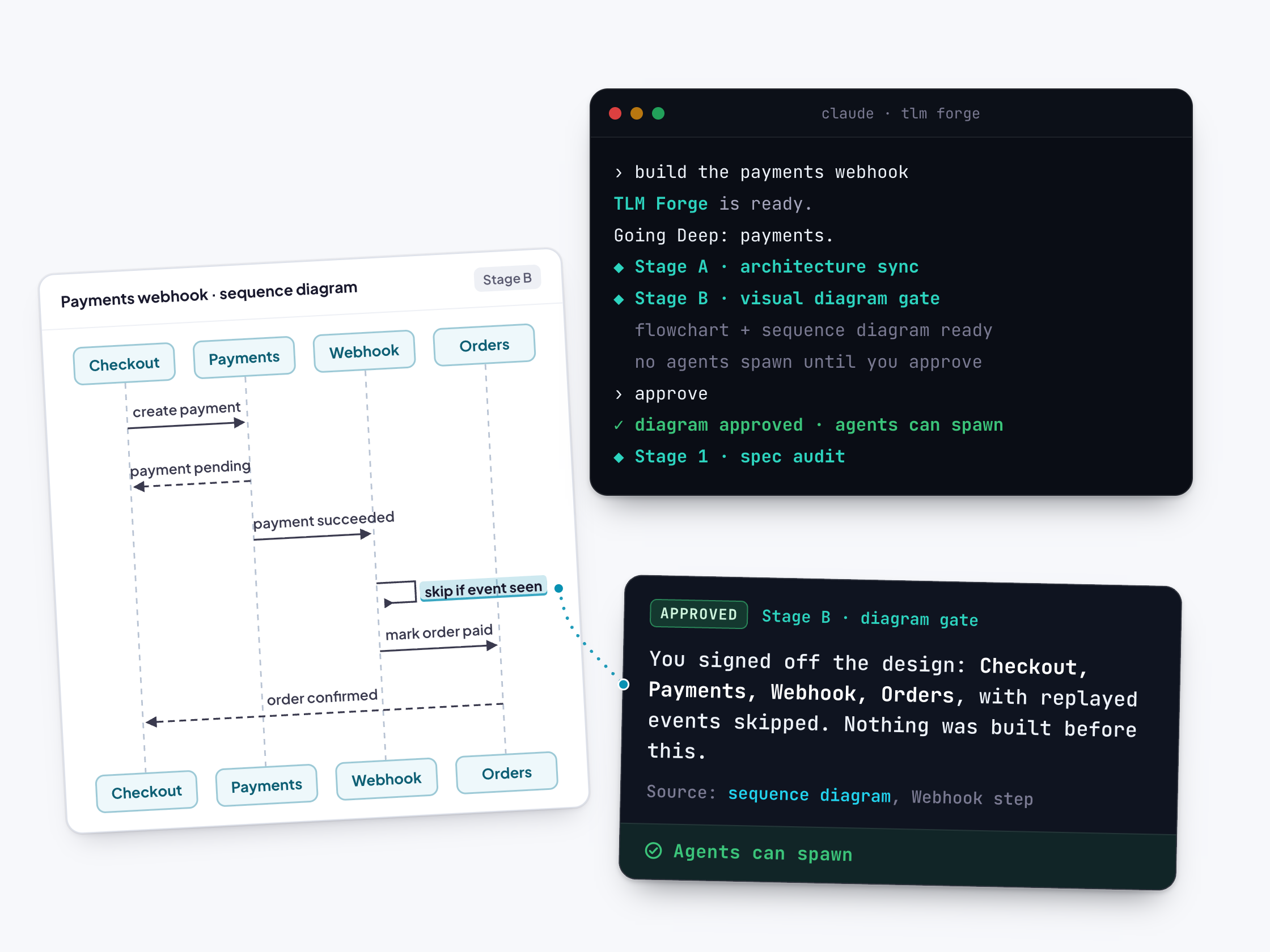
Why it is better
Wrong designs are caught early
Without TLM Forge, you first see the design as finished code. With it, you see two diagrams before any code exists, when a correction costs one reply.
Done has a definition
Without TLM Forge, done means whatever the AI decided. With it, done is a written list you signed, and TLM Forge tells Claude to report any check without proof as unmet.
The stop really is a stop on Pro
Without a built-in check, an AI can print the diagrams and carry on in the same breath. On Pro, the plugin looks for the diagrams and your reply after them before any agent launches or code is written.
New designs are challenged before you see them
On brand new Deep work, councillors who never saw Claude's draft propose alternatives, so you are not approving a design nothing has questioned.
Good to know
- Light work prints the diagrams and keeps going: no stop and no goal contract. On Pro with GitHub issues turned on, a public repo gets one extra, one-time confirmation before its first issue is created.
- The council is off by default. Turn it on in .tlmforge.json. At the default settings (three councillors, up to two rounds) it costs 7 extra agent calls per round, so up to 14 per feature. TLMFORGE_DEBATE=0 turns it off and overrides the config.
- If fewer than two councillors give a usable answer, TLM Forge records that no debate happened instead of claiming agreement.
- Hiding names lowers, but does not remove, the chance that rankers recognise Claude's own draft by its length or style. TLM Forge says so plainly.
- To get past an enforced stop on purpose, set TLMFORGE_HOOKS=0 or include "just do it" in your message.