Every run ends with proof you can open and look at
At the end of a Medium or Deep run, TLM Forge gives you one page of proof: a version you can run, screenshots or real output, and before and after views wherever a before exists. Claude also writes a status report with the leftover issues and saves lessons for the next feature.
How to use it
/tlmforge:buildRuns on its own inside /tlmforge:build at the end of every Medium and Deep run, after the final review (Stage 5) and, on Deep, the live check (Stage 6). Light work has no proof pack; its evidence goes in one phase-evidence.md file or the commit message.
Words you will see on this page
- Proof pack
- One HTML page holding all the evidence that the change works.
- Before and after
- The same steps run on your code from before the change and on the new code, shown side by side.
- Base commit
- The saved snapshot of your code from before the change started.
- Residual list
- Findings rated MEDIUM or LOW that were left unfixed, listed so you can decide on them.
- STATUS.md
- The feature's status report: phases, test counts, leftover issues and an honest assessment.
- learnings.md
- A running file of lessons from past runs that the next feature reads before planning.
What is in the proof pack
| Part | What it is | Notes |
|---|---|---|
| Working version | Something you can run yourself | The exact command, URL or preview, or what stands in if it cannot run locally |
| Visual proof | What the change looks like or prints | Screenshots, a recording, or real terminal output |
| Before and after | Old and new, same steps, side by side | Only when a before state exists |
| Commands run | Each command with a pass, fail or info result | Listed in a table on the page |
| Gaps | Anything that could not be captured | Always with the reason, such as no emulator |
Light vs Medium vs Deep: how a run ends
| Kind of work | Checks before the end | How it ends |
|---|---|---|
| Light: a tiny edit like a typo or rename | A test first, no review agents | No proof pack; evidence in one phase-evidence.md file or the commit message |
| Medium: fixing or improving existing behavior | Final review by two reviewers (three if there is UI) | Proof pack and a shorter STATUS.md |
| Deep: a new capability or a security change | Final review by five reviewers (six if there is UI), then the live check | Proof pack and a full STATUS.md |
What it does
The proof pack answers "does it work?" with things you can look at. It includes a working version you can start, with the exact command, URL or preview, or a note on what stands in when it cannot run locally. It includes visual proof: screenshots for UI work, a recording when things move, and real terminal output for command line, hook or API work, never a mock-up. Anything Claude could not capture is listed with the reason.
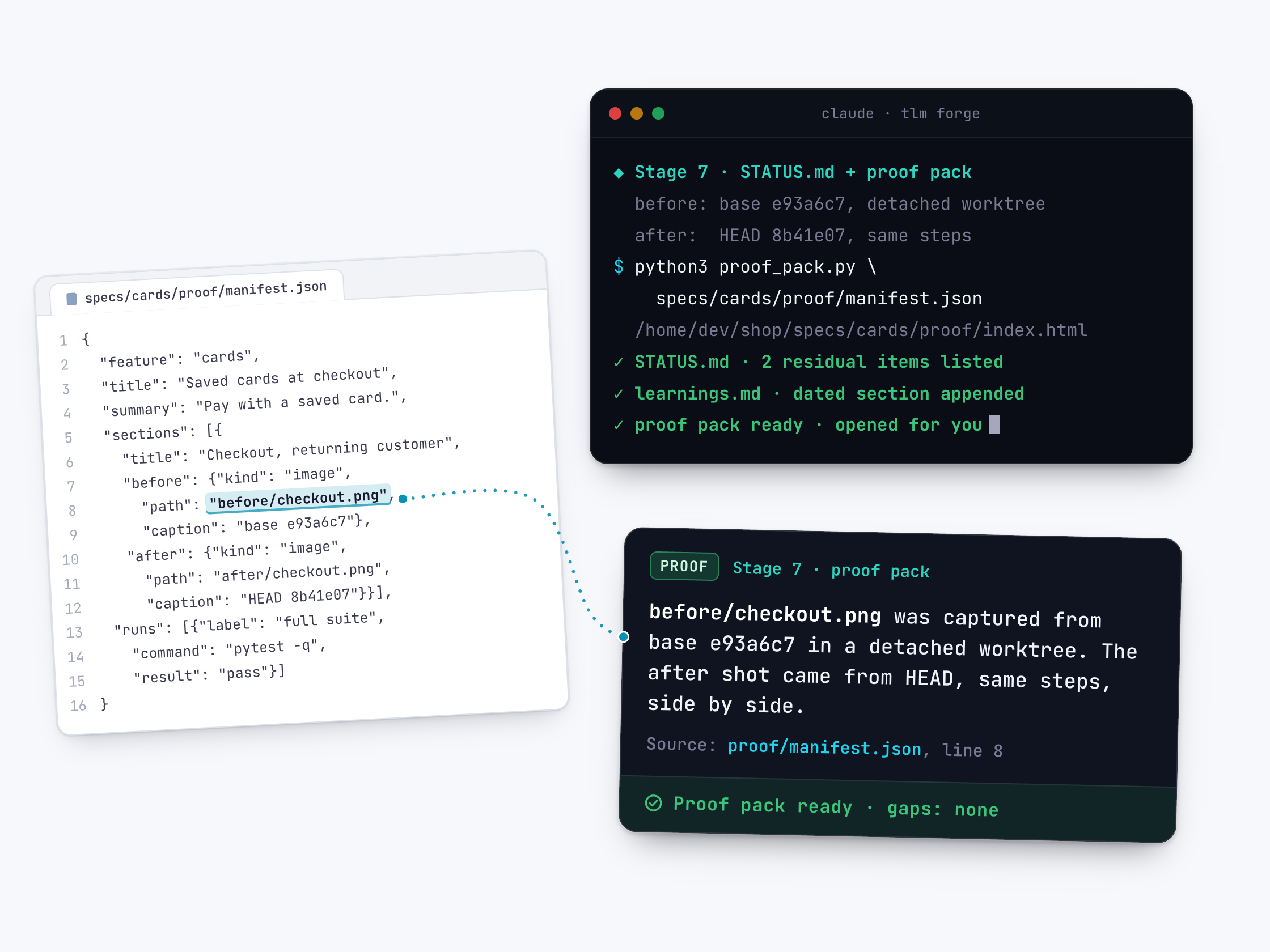
When a before state exists, Claude captures it from the base commit (your code before the change) in a separate temporary checkout, then captures the after state from your latest commit with the same steps. Everything lands on one page, specs/<feature>/proof/index.html. If your plugin includes the helper script proof_pack.py, it builds that page from a list of the evidence. Otherwise Claude writes the page by hand.
Claude then writes STATUS.md, a status report with the phases, test counts, the residual list (MEDIUM and LOW findings left unfixed) and an honest assessment. Deep runs add more, such as an architecture diagram and an operator runbook. Claude adds a dated entry to learnings.md, which the next feature reads before planning, and releases the commit lock. You review the pack and say "close", or send leftover items back.
How it works, step by step
Capture before and after
Claude runs the same steps on the old code and on the new code, saving screenshots, recordings or terminal output.
List the evidence
A small file, manifest.json, lists each before and after item and the commands run with pass, fail or info results.
Build one page
The helper script turns that list into one HTML page. If the script is not installed, Claude writes the page by hand.
Write the status report
STATUS.md records the phases, test counts and leftover issues for anyone reviewing later.
Save the lessons
A short dated entry goes into learnings.md so the next feature starts from it.
Hand it over
Claude opens the page or gives you its path with a three to five line summary. The run waits until you say close or send items back.
What it looks like
Building the proof page with the helper script, which prints where it saved the page, then the lessons entry the run leaves in learnings.md. (Formats from the plugin, one heading's dash replaced; content made up.)
$ python3 <skill-dir>/proof_pack.py specs/saved-cards/proof/manifest.json --strict
/home/dev/shop/specs/saved-cards/proof/index.html

$ tail -4 learnings.md
## saved-cards, 2026-10-14
- Surprise: the sandbox gateway retries on its own; lesson: count charges, not calls
- Pattern that worked: one replay test per webhook event type
- Pitfall avoided: dropping the old card column before the last phase
Why it is better
Proof you can see
Without TLM Forge, you often get an agent's summary saying the work is done. With it, you get screenshots, recordings or real terminal output on one page.
A fair before and after
Without a matched comparison, a difference could come from how each side was captured. With TLM Forge, both sides use the same steps, so what differs is down to the change.
Gaps are stated, not hidden
Without this rule, missing evidence can go unnoticed. With TLM Forge, anything that could not be captured, such as when there is no emulator or secrets are missing, is listed with the reason.
The next feature starts smarter
Without a record, each feature starts from scratch. With TLM Forge, learnings.md keeps the non-obvious lessons, and the next feature's planning reads them first.
Good to know
- The helper script only builds the page. Running the steps, taking screenshots and capturing output is Claude's job.
- Screenshots and recordings stay on disk next to the page and are not committed to git, so open the page locally. Moving it without its files breaks the links.
- If your installed plugin does not include the helper script, Claude writes the single HTML page by hand with no external links.
- The run stops at the proof pack. TLM Forge does not start another review round on its own; you decide whether to close or send items back.
- Evidence files must sit inside the proof folder. Paths that point outside it show up as REJECTED boxes instead of loading.