The build pauses after the design so you can answer
On Medium and Deep work, TLM Forge shows you the design and should then stop for your reply. On Pro, a built-in check enforces that stop. Until there is an entry from you after the design, Claude is blocked from launching subagents (helpers such as reviewers) or editing files outside specs/ and docs/, where the design documents live.
How to use it
/tlmforge:buildRuns on its own before every subagent launch and file edit (the Agent, Edit, Write, MultiEdit and NotebookEdit tools) while a Medium or Deep run started with /tlmforge:build is open. Active on Pro. Writes under specs/ and docs/ are always allowed.
Words you will see on this page
- Design gate
- The point where TLM Forge shows you diagrams of the planned change and asks if they match what you want.
- Presentation block
- The message that shows the design: two diagrams, plus a 📐 line pointing to the design file and a 🔗 line pointing to the GitHub issue.
- Subagent
- A separate AI helper that Claude launches, such as a reviewer.
- Transcript
- The saved record of your conversation with Claude in this session.
- Hook
- A small check built into the plugin that runs before Claude acts and can stop the action.
- Pro
- The TLM Forge plan on which this check is switched on.
What the check sees, and what happens
| What the transcript shows | What happens next |
|---|---|
| No design shown yet | Blocked: "The design has not been shown yet." |
| Design shown, then Claude carries on in the same turn | Blocked: "The design was shown, but nobody was given a chance to answer." |
| Design shown, then an entry from you | Allowed |
| Design changed and shown again | A new entry from you is needed after the new version |
| Only one diagram, or no 📐 and 🔗 lines | Does not count as the design being shown |
What it watches, and what it leaves alone
| Action | Checked? |
|---|---|
| Launching a subagent, such as a reviewer | Yes |
| Editing or writing files outside specs/ and docs/, such as code | Yes |
| Writing files under specs/ or docs/ | No, that is the design work itself |
| Reading or searching files | No |
| Commits | No, the GitHub design gate covers those |
| Light work, or no open run | No |
What it does
On Medium and Deep work, TLM Forge tells Claude to stop at the design gate: show a flowchart and a sequence diagram, ask if they match what you want, and wait. But a rule in a prompt is only an instruction. The failure seen in practice was Claude walking straight past the gate: no diagrams, no question, on to the next stage. A check at commit time is far too late for that.
So this check runs at the moment it matters: the tool call that would start the next stage. Launching a subagent starts plan review, and editing code starts the build, so it watches those calls. Reading is never checked. Writing under specs/ and docs/ is always allowed, because drafting the design documents is the gate's own work, and blocking it would leave the run stuck.
It reads the session transcript, the record of what you were actually shown. It looks for the latest message with the full design: two diagrams plus the 📐 design line and the 🔗 issue line. If there is none, the call is blocked. If there is one but no entry from you after it, the call is blocked too. Each time the design is changed and shown again, a new entry from you is needed.
How it works, step by step
Watches next-stage actions
Subagent launches and file edits. Read-only actions are not checked.
Lets the design work through
Any file under specs/ or docs/ can always be written, so the design documents can be finished.
Only during an open run
It acts only while a Medium or Deep run is open, from this session or less than seven days old.
Looks for the design
It finds the latest full design message in the transcript. If there is none, the call is blocked and Claude is told to show the design and stop.
Looks for your turn
There must be an entry from you after that design. If Claude showed it and kept going, the call is blocked and Claude is told to end its turn and wait.
Escape hatches
An override phrase in your latest message, or TLMFORGE_HOOKS=0, lets the call through.
What it looks like
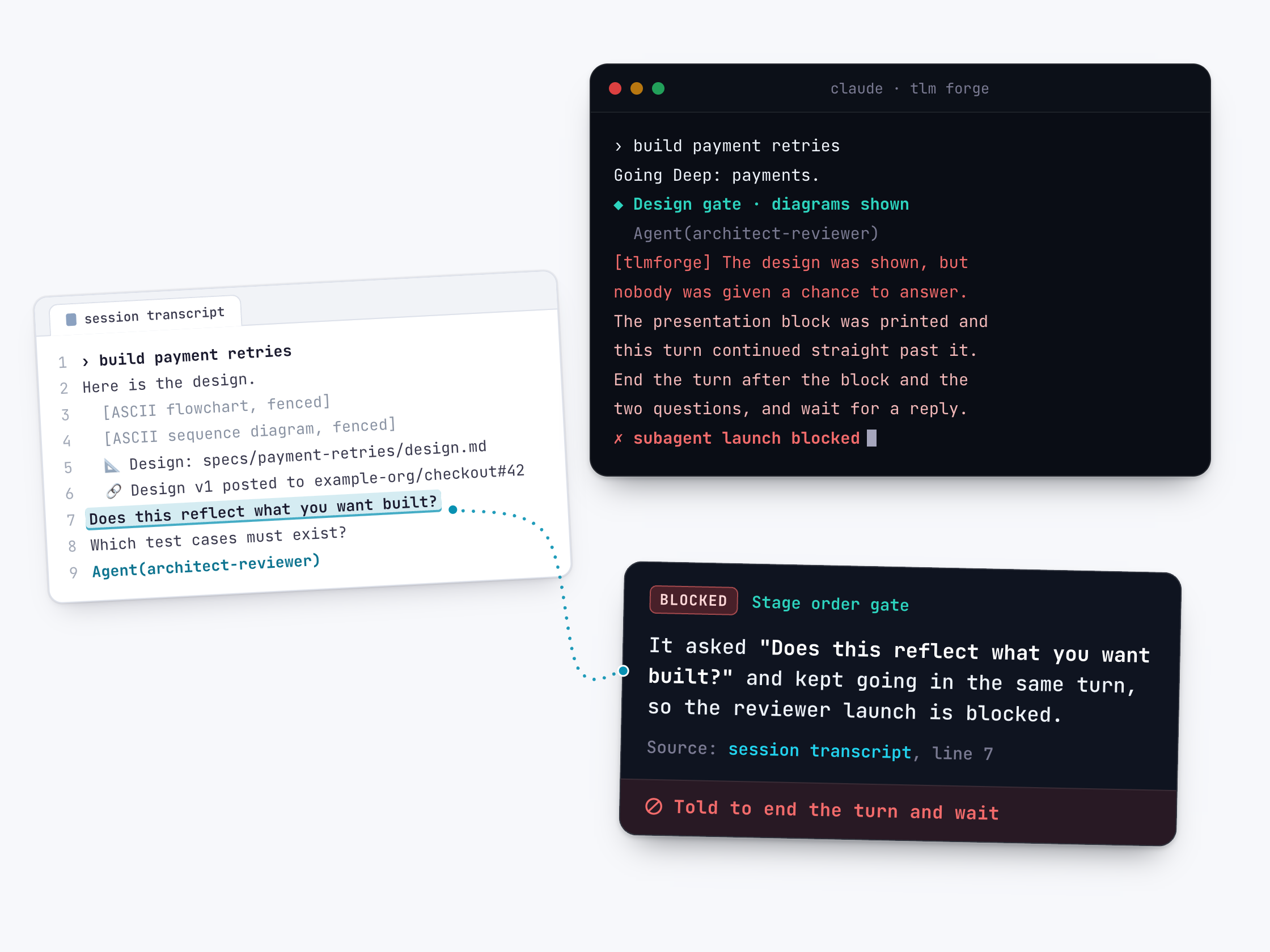
Claude shows the design and tries to launch a reviewer in the same turn, without waiting (invented feature, message shortened). The check blocks the launch and tells Claude to wait for a reply.
› build payment retries for failed charges
  [flowchart and sequence diagram printed]
  📐 Design: specs/payment-retries/design.md (written at Stage 2)
  🏛 Architecture: docs/ARCHITECTURE.md
  🔗 Design v1 posted to example-org/checkout#42
  Does this reflect what you want built?
  Agent(architect-reviewer)
[tlmforge] The design was shown, but nobody was given a chance to answer.
End the turn after the block and the two questions, and wait for a reply.
To proceed anyway: set TLMFORGE_HOOKS=0, or include 'just do it' in your message.
Why it is better
The stop is enforced, not just requested
Without TLM Forge, a prompt can say "wait for approval" and still be ignored. With it, on Pro, the next stage's first subagent launch or code edit is blocked until there is an entry from you after the design, however long the run.
Caught early, not at commit
Without it, you might only notice at commit time, after the build. With it, the check fires at the first reviewer launch or code edit, while changing course is still cheap.
Half a design does not count
Without a strict check, one quick diagram could pass for the design. With it, only the full presentation counts: both diagrams plus the lines pointing to the design file and the issue.
Never gets stuck
Without care, a check like this could block its own design work. With it, files under specs/ and docs/ stay writable and reading is never checked.
Good to know
- Active on Pro. The setting is controlled from the TLM Forge server, so it can change without a plugin update.
- It applies only while a Medium or Deep run is open. Light work does not open a run.
- It checks the order of the conversation, not what you said. It confirms there is an entry from you after the latest design; it does not read whether you approved. TLM Forge tells Claude to wait for a clear yes, and to redraw and ask again if you want changes.
- To get past it, include "just do it" in your latest message ("be quick" and "trivial fix" also work), or set TLMFORGE_HOOKS=0.
- It does not check commits. Whether the design reached GitHub is checked before commits by the GitHub design gate.