Catch accessibility and design slips on changed screens
When a task changes what users see, TLM Forge adds a reviewer for the screens. It looks for buttons a screen reader cannot name, missing empty or error states, and broken platform rules. Each issue comes with the file, the line and a fix.
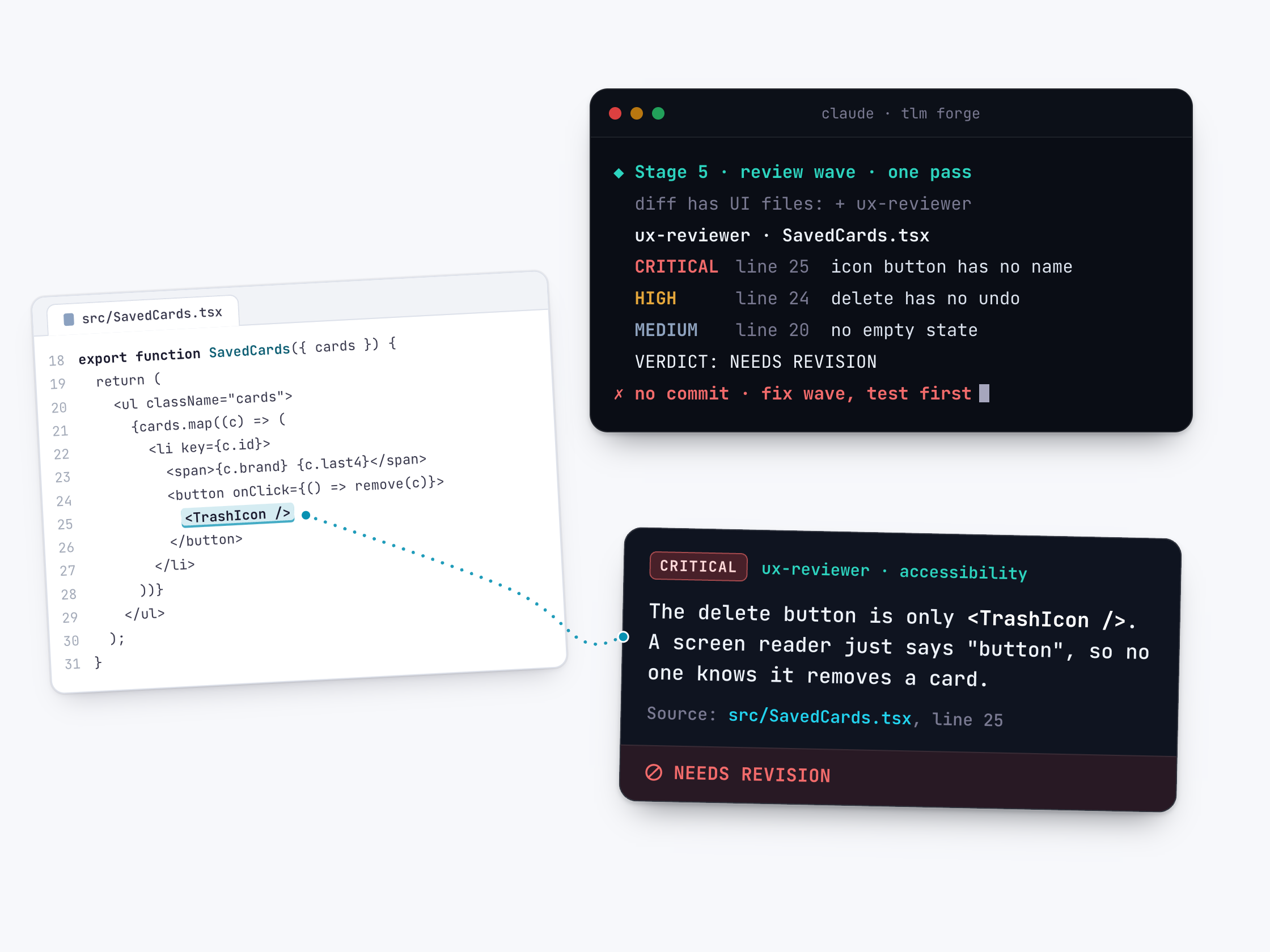
How to use it
You never start it yourself. On Medium and Deep tasks, /tlmforge:build adds it to plan review (Stage 3) if the plan includes screens, and to the final review (Stage 5) if the changed files include UI code. If, at the final review, it is unclear whether the changed files touch UI, TLM Forge leaves it out.
Words you will see on this page
- UI
- User interface: the screens, buttons and text people see.
- Accessibility
- Making the app usable for everyone, including people who use screen readers or larger text.
- Screen reader
- Software that reads the screen aloud for people who cannot see it well.
- WCAG AA
- A common accessibility standard; for web text it asks for at least 4.5:1 contrast.
- Empty state
- What a screen shows when there is no data yet.
- Plan review and final review
- The two review points: when the plan is checked, in the background as the build starts (Stage 3), and after the code is built and tested (Stage 5).
What it looks for
| What it looks for | An example of what it catches |
|---|---|
| Buttons with no name | A trash icon button that a screen reader reads only as "button". |
| Deletes with no way back | Removing a saved card with no undo and no confirm step. |
| Missing empty states | A card list that shows a blank area when there are no cards. |
| Hard-to-read text | Web text below 4.5:1 contrast with its background. |
| Layouts that break on small screens | A form that works on desktop but overflows at phone width. |
| Unlabelled form fields | An input with no label and no inline error message. |
| Small tap targets (Android) | A button smaller than 48dp, hard to hit with a thumb. |
| Text that does not scale | Text that clips at 200% font size on Android, or ignores Dynamic Type on iOS. |
When it runs
| Level | What the task is | Does this reviewer run? |
|---|---|---|
| Light | A tiny change you can read in ten seconds, like a typo, a rename or a config value | No. Claude makes the change directly, test first, with no review agents. |
| Medium | Fixing or improving something that already exists, with nothing new for users | Only if screens change: at plan review if the plan includes UI, and at final review if the changed files include UI code. |
| Deep | Something new (a feature, screen, endpoint or integration), or anything that changes how the system makes security decisions | Same as Medium: only when screens change. |
What it does
Functional tests rarely notice that an icon button has no name, that error text is too faint to read, or that a list has nothing to show when empty. This reviewer looks for exactly that. It only joins when your work touches screens. TLM Forge spots UI changes by file type and folder, such as .tsx, .vue, .html, .css or Android layout files.
Its checklist depends on the platform. Web: phone, tablet and desktop widths, labelled form fields, loading and empty states, readable contrast. Android: Material 3 parts, large enough tap targets, the back button, text at 200% size. iOS: navigation, Dynamic Type, safe areas and sheets. Everywhere: clear hierarchy, feedback, undo or confirm before deleting, screen reader labels, keyboard use and reduced motion.
In the final review it looks only at the screens this feature changed, not your whole app. Every issue goes in a table with the part, the file and line, the problem, how serious it is, and the fix. It is not allowed to stay silent: if all is well, it must list the files it checked and say so.
How it works, step by step
TLM Forge checks for screen changes
At plan review it checks whether the plan includes screens. At final review it checks the changed files for UI code.
It reads your design rules first
It reads the UI files, theme files and any design notes, so it judges your screens by your app's own style.
It runs the platform checklist
Web, Android or iOS rules first, then checks that apply everywhere: hierarchy, feedback, accessibility and wording.
It writes the table and a verdict
One row per issue, with file, line and fix. The verdict is APPROVE, NEEDS REVISION or REJECT.
Serious issues get fixed
In the final review, CRITICAL and HIGH issues are fixed, each with a failing test written first. Smaller ones go on a list of known leftovers for you.
What it looks like
The table this reviewer must write, then its verdict. Each row is one problem: which part of the screen, where in the code, what is wrong, how serious it is, and the fix. The format is real; the content is made up for illustration.
| Component | File:line | Issue | Severity | Fix |
|---|---|---|---|---|
| DeleteButton | SavedCards.tsx:25 | icon-only button, no accessible name | CRITICAL | add aria-label="Remove card" |
| DeleteButton | SavedCards.tsx:24 | destructive action, no undo or confirm | HIGH | show an undo toast |
| CardList | SavedCards.tsx:20 | no empty state for zero cards | MEDIUM | add a message and an Add card button |

## VERDICT: NEEDS REVISION

## Accessibility Issues
- SavedCards.tsx:25 icon has no label (WCAG 2.1 AA, name and role)
Why it is better
Only when screens change
Without TLM Forge, you either review every change for UX or none. With it, a backend-only change skips this review, and a detected screen change gets one.
Checks you can verify
Without clear rules, UX feedback is often a matter of taste. With it, many checks have concrete bars, such as 4.5:1 text contrast on the web and 48dp tap targets on Android.
No silent passes
Without a rule, an empty review can look like a clean one. With it, the reviewer must write its table or list the files it checked, and a missing result counts as a CRITICAL.
Good to know
- Its instructions have it read code, theme and design files, not open the running app. On Deep work, a later step (live verification) checks the running feature. Medium work has no live verification step.
- In the final review it only checks the screens this feature changed, not the rest of your app.
- If, at the final review, TLM Forge cannot tell whether the changed files touch UI, it skips this reviewer. A UI change in an unusual file type may not trigger it.
- It does not run on Light work, which uses no review agents.